Promote your music safely, bot-free, and policy compliant with SubmitLink (10% OFF)
Spotify Analytics for every artist
TL;DR
Spotify analytics should help you understand what is growing, why it is growing, and what to do next. artist.tools gives artists, managers, labels, and marketers a deeper way to track artist performance, track-level stream data, playlist placements, curator quality, historical trends, and playlist risk so you can make better release, marketing, pitching, and roster decisions.
Spotify Analytics Should Be More Than a Stats Page
A lot of people search for Spotify analytics when they really mean one of two things.
Some are looking for personal Spotify stats: their top artists, most played songs, listening minutes, favorite genres, and year-end style summaries. That is useful for listeners, but it is not enough for an artist team.
Artists, managers, labels, and marketers usually need something different. They need to understand how music is performing, where momentum is coming from, which tracks are moving, which playlists matter, and whether a campaign is creating real traction.
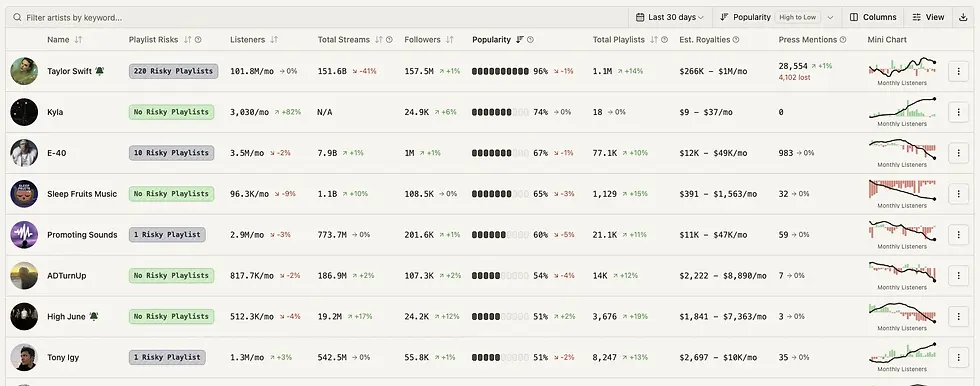
That is where artist.tools fits. It is built around Spotify artist analytics, track analytics, playlist research, curator analytics, and campaign context rather than personal listening history.
Personal Spotify Stats vs. Artist Spotify Analytics
Not every Spotify stats tool is solving the same problem.
If You Want To... | You Probably Need... | What It Helps With |
See your own top songs and artists | Personal Spotify stats | Understanding your listening habits |
Track an artist’s monthly listeners | Spotify artist analytics | Measuring artist growth and audience momentum |
Check a song’s stream count | Spotify track analytics | Understanding track performance over time |
Review playlist placements | Spotify playlist analytics | Seeing where streams and discovery may be coming from |
Evaluate a playlist before pitching | Playlist analyzer | Checking playlist quality, history, and bot risk |
Research a curator | Curator analytics | Understanding curator reach, playlists, and contact context |
Compare artists or releases | Music industry analytics | A&R, marketing, roster, and campaign decisions |
For a listener, “Spotify analytics” might mean “what did I listen to most?” For a working artist team, it means “what is happening with this artist, track, playlist, or campaign, and what should we do next?”
The Metrics That Actually Matter
Spotify data becomes useful when it helps you make decisions. A raw number is only the start.
Metric | What It Tells You | How To Use It |
Monthly listeners | Current audience reach | Track artist momentum and market response |
Followers | Long-term fanbase growth | See whether listeners are converting into fans |
Stream count | Track-level consumption | Measure release performance and catalog demand |
Playlist placements | Discovery sources | Understand where exposure is coming from |
Playlist position | Visibility inside a playlist | Estimate how meaningful a placement may be |
Historical charts | Performance over time | Separate short spikes from lasting growth |
Listener geography | Where demand is forming | Plan ads, content, touring, and regional campaigns |
Playlist quality | Whether exposure is healthy | Avoid risky or low-quality placements |
Curator data | Who controls playlist reach | Research pitching opportunities and risk |
Press and context signals | What may have caused movement | Explain spikes beyond the dashboard |
The goal is not to stare at Spotify stats every day. The goal is to know which signals are worth acting on.
Start With Artist Analytics
Artist-level data answers the big-picture question: is the artist actually growing?
With artist analytics, you can look at monthly listeners, followers, playlist placements, historical performance, and related signals in one place.
This helps you understand whether momentum is building across the artist profile or only appearing around one temporary spike.
A useful Spotify monthly listeners tracker should help answer questions like:
Are monthly listeners rising steadily or only reacting to one playlist add?
Are followers growing with listeners, or is the audience not converting?
Which tracks are driving the artist’s current momentum?
Are playlist placements expanding or shrinking?
Is growth concentrated in a specific market?
Did a press mention, playlist add, or campaign event line up with the spike?
Artist analytics are especially useful for managers, labels, A&R teams, and marketers who need to monitor more than one release at a time.
Then Look at Track Analytics
Track-level data is where you figure out which songs are actually working.
A track can perform well because of algorithmic discovery, editorial placement, user playlists, social momentum, catalog interest, or paid promotion. Looking only at the artist profile can hide those differences.
With track analytics, artist.tools helps you inspect Spotify stream count, playlist placements, historical charts, and track-specific performance context.
Use track analytics when you need to know:
Which song is driving the current spike?
How many streams does the track have?
Which playlists are connected to the track?
Is the track gaining momentum or flattening out?
Did the release perform better than previous tracks?
Are streams coming from healthy discovery sources?
Should this song get more marketing budget?
Track analytics are useful after release day, but they are also valuable for catalog research. Sometimes the best marketing opportunity is not the newest song. It is the track already showing signs of organic demand.
Playlist Analytics Explain the “Why”
Streams rarely appear from nowhere. Playlists are often a major part of the story.
A playlist add can change a track’s trajectory, but not every playlist has the same value.
A small playlist with real listeners can be more useful than a large playlist with weak engagement or suspicious growth. A high-position placement can matter more than being buried near the bottom. A genre-aligned playlist can create better audience quality than a broad playlist with no clear listener intent.
That is why playlist analyzer data matters.
Playlist Question | Why It Matters |
How many followers does the playlist have? | Measures potential reach |
How has the playlist grown over time? | Helps detect healthy vs. suspicious growth |
Where is the track positioned? | Higher placements usually create more exposure |
What kind of music does the playlist add? | Shows audience and genre fit |
Is the playlist likely botted? | Protects against artificial streaming risk |
Who owns or manages the playlist? | Helps with curator research |
Has the playlist driven results before? | Helps prioritize future pitching |
Spotify playlist analytics are not just about finding big playlists. They are about understanding which placements are worth pursuing and which ones could create bad data or risk.
Curator Analytics Add Another Layer
Behind many playlists is a curator. If you are pitching music, evaluating a campaign, or reviewing where an artist is getting added, curator context matters.
With curator analytics, you can research playlist owners, their playlist network, contact context where available, and signs of quality or risk.
That helps answer questions like:
Does this curator manage one playlist or many?
Are their playlists growing normally?
Do they control playlists in the right genre?
Are any of their playlists marked as risky?
Is this a real promotional opportunity or a low-quality placement path?
Should this curator be added to a campaign list or avoided?
For artist teams, curator analytics can be the difference between “this playlist has followers” and “this is a curator we should understand before we pitch.”
How To Read a Release Spike
A spike is not automatically good or bad. It is a clue.
When a track jumps, use a simple diagnostic workflow:
Step | What To Check | What You Are Looking For |
1 | Track stream count | Did the spike happen on one song or across the catalog? |
2 | Playlist adds | Did a new playlist placement appear around the same time? |
3 | Playlist quality | Is the playlist healthy, relevant, and likely bot-free? |
4 | Artist followers | Are listeners converting into longer-term fans? |
5 | Monthly listeners | Is reach expanding beyond the existing audience? |
6 | Geography | Does the location data make sense for the campaign? |
7 | History | Is this a one-day jump or sustained growth? |
If streams rise but followers, saves, playlist context, and geography do not make sense, the spike may deserve closer review. If streams rise alongside healthy playlist adds, follower growth, and believable market movement, that is a stronger sign of real momentum.

What To Track Weekly
Spotify analytics are easiest to use when you review them consistently. A weekly check is usually enough for most artists and campaign teams unless a release is actively launching.
Weekly Check | Why It Helps |
Artist monthly listeners | Shows current reach and momentum |
Artist followers | Tracks fan conversion |
Top tracks | Reveals which songs are carrying demand |
New playlist placements | Shows discovery sources |
Playlist quality | Helps avoid artificial streaming risk |
Track stream movement | Measures campaign and catalog performance |
Curator activity | Identifies useful or risky playlist networks |
Historical trend changes | Separates real growth from noise |
If you only look at Spotify analytics when something goes wrong, you lose the baseline. A normal week gives you the context to understand an unusual one.
When Spotify for Artists Is Enough, and When It Is Not
Spotify for Artists is useful, especially if you control the artist profile. It gives artists access to important first-party performance data, audience insights, source-of-streams context, and release information.
But many teams need more than that.
Spotify for Artists Is Useful For | artist.tools Is Useful For |
Your own artist profile | Public artist, track, playlist, and curator research |
First-party artist data | Competitive and discovery workflows |
Basic audience and song insights | Historical charts and broader music intelligence |
Understanding your own catalog | Researching other artists, tracks, playlists, and curators |
Release monitoring | Playlist quality, bot-risk, and campaign review |
Artist-owned workflows | Manager, label, marketer, A&R, and curator workflows |
If you only need to check your own verified artist profile, Spotify for Artists may answer many questions.
If you need to research the wider Spotify ecosystem around artists, tracks, playlists, and curators, artist.tools gives you a broader view.
Spotify Analytics Use Cases
Different users come to Spotify analytics with different jobs to do.
User | What They Need From Spotify Analytics |
Artist | Understand which songs are growing and where fans are coming from |
Manager | Monitor roster performance and spot campaign opportunities |
Label | Track artists, releases, playlists, and market movement at scale |
Marketer | Measure campaign results and identify useful discovery sources |
A&R | Find artists with real growth signals and compare momentum |
Playlist curator | Understand playlist health, growth, and positioning |
Publicist | Connect press, playlist, and streaming movement |
Booking team | Identify cities and regions where demand is building |
A good Spotify tracker should not treat every user the same. The useful view depends on the decision you are trying to make.
A Practical Spotify Analytics Workflow
Use this workflow when reviewing an artist or release in artist.tools:
Start with the artist. Review monthly listeners, followers, historical trends, and the artist’s current top tracks.
Open the tracks that are moving. Look at Spotify stream count, playlist placements, and track-level history.
Check the playlists behind the movement. Use the playlist analyzer to review follower growth, playlist quality, and bot-risk signals.
Research the curators. Use curator analytics to understand who controls relevant playlists and whether they are worth pitching again.
Compare the spike to real conversion. Look for follower growth, repeat movement, and believable market context instead of only stream volume.
Decide what to do next. That might mean increasing campaign spend, pitching similar playlists, building a regional content plan, avoiding a risky curator, or focusing on a track that is already showing demand.
What Good Spotify Analytics Should Help You Decide
Spotify analytics are only valuable if they change the next action.
They should help you decide:
Which track deserves more promotion
Which playlist placements are actually useful
Which curators are worth researching
Which markets deserve more attention
Whether a release is gaining real traction
Whether a spike looks healthy or suspicious
Which artists are growing faster than peers
When to keep pushing a campaign
When to stop wasting spend
When to investigate playlist quality
Data should reduce guessing. If a dashboard gives you numbers but no path to a better decision, it is not doing enough.
FAQ
What is Spotify analytics?
Spotify analytics refers to data about performance on Spotify, including artist growth, track streams, playlist placements, monthly listeners, followers, audience geography, and historical trends. For artists and music teams, it is different from personal Spotify stats because the goal is to understand music performance, not listening habits.
What is the difference between Spotify stats and Spotify analytics?
Spotify stats often refers to personal listening data, like top songs, top artists, and most played tracks. Spotify analytics usually refers to artist, track, playlist, and audience performance data used by artists, managers, labels, marketers, and music industry teams.
Can I track Spotify monthly listeners?
Yes. A Spotify monthly listeners tracker helps you see how an artist’s reach changes over time. In artist.tools, monthly listener data can be reviewed alongside followers, playlist placements, historical trends, and other artist analytics.
We also have a tool for this: Monthly Listeners Tracker
How do I check Spotify stream count for a track?
Use track analytics in artist.tools to review track-level Spotify analytics, including stream count context, playlist placements, historical charts, and related performance signals.
We also have a specific tool for this: Stream Count Checker
Can I analyze Spotify playlists?
Yes. Use the playlist analyzer to review Spotify playlist analytics, including follower data, playlist history, track context, contact info where available, and bot-risk signals.
What are curator analytics?
Curator analytics help you research playlist owners and curator networks. This is useful for playlist pitching, campaign planning, contact research, and avoiding low-quality or risky playlist ecosystems.
Is artist.tools a replacement for Spotify for Artists?
Not exactly. Spotify for Artists is useful for first-party access to your own verified artist profile. artist.tools is broader: it helps with public artist analytics, track analytics, playlist analyzer workflows, curator analytics, historical research, and music industry discovery use cases.
What Spotify analytics should artists check most often?
Artists should regularly check monthly listeners, followers, top tracks, stream movement, playlist placements, and geography. During a campaign, they should also review playlist quality and whether stream growth is converting into real audience signals.
Why do playlist analytics matter?
Playlist analytics help explain where streams may be coming from. They can show whether a playlist placement is relevant, visible, healthy, or potentially risky. This helps artists and teams avoid judging promotion by stream count alone.
Who uses Spotify analytics?
Spotify analytics are used by artists, managers, labels, distributors, marketers, playlist curators, A&R teams, publicists, and booking teams. Each group uses the data differently, but the shared goal is to understand music performance and make better decisions.
Advanced Analytics, Charts, & Playlist History over 4+ years
Analyze how artists, tracks, playlists, or curators have evolved over time, and whether that evolution is artificial.
.jpg)
.jpg)
Detect Playlist Placements likely to deliver Artificial Streams
Get notified when your music is discovered in playlists likely to deliver artificial streams, the most common source of fraud.
.jpg)
.jpg)
Granular search across 20M+ Spotify assets
Source curator emails, trending artists, AI-generated tracks, & more using highly-granular search filters.
Contacts
Listeners
| >200K
Demographic
| Phillipines
Grow bigger & better playlists with Spotify Search Traffic
Discover underserved search intents that shape your playlist strategy.
meditation mix
12K searches/month
Highly competitive
meditation for adhd
2.9K searches/month
Low competition
Discover where you're being talked about online
Detect online mentions; like press articles, social mentions, & more.
_.jpg)
PRICING
Unlimited artists. Every plan.
bot detection, analytics, & more, on 20M+ assets

GET STARTED
Protect your music career
start for free, upgrade as your career evolves
.png)
artist.tools
A data platform providing comprehensive bot detection, playlist analysis, and curator contact info for artists, labels, and distributors to build & maintain safe & successful careers in the music industry
See why industry leaders like
DistroKid, UnitedMasters, TooLost, ReverbNation, and Ditto recommend artist.tools to their users.
Sister projects:
SubmitLink | PlaylistScaler | SERPclimber
Content
Link
© 2026 ALW Holdings Inc. All rights reserved.

.png)