How Do I Find Playlists on Spotify A Guide for Artists
- Jan 19
- 13 min read
Finding playlists on Spotify starts with the app's powerful search bar, but the real secret for artists is knowing what to look for. You can find playlists by searching for keywords, digging into genres, browsing Spotify’s own curated hubs, and even picking apart the profiles of artists in your scene. This guide will show you how to move past basic searches and start thinking like a pro with a more strategic, data-driven approach.
Your Guide to Finding Spotify Playlists That Matter
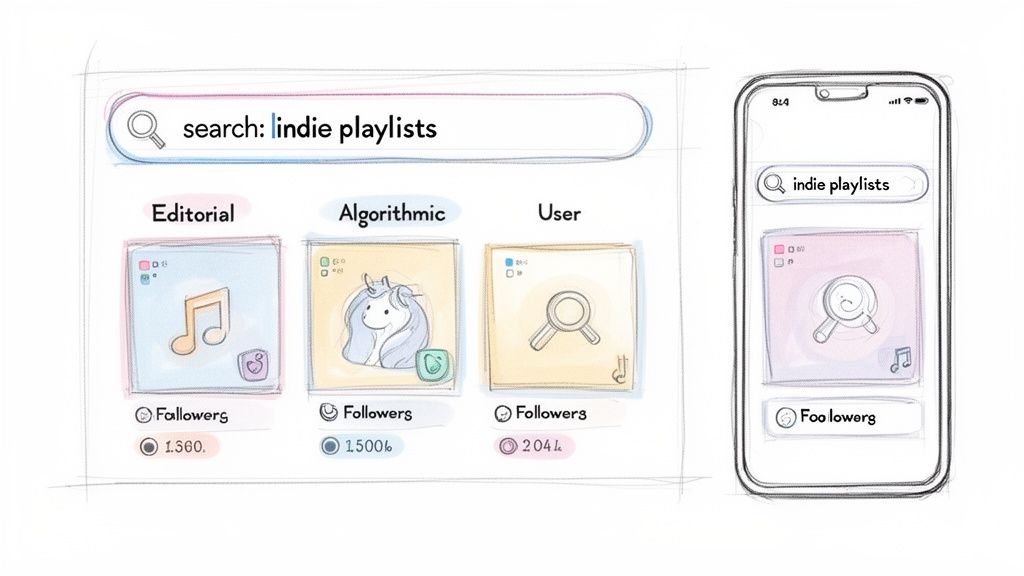
If you're an artist trying to get your music heard, the sheer number of playlists on Spotify can feel totally overwhelming. We're talking nearly 9 billion user-generated lists alone. It's a lot of noise.
The key isn't just finding any playlist; it's about finding the right ones. The ones that can actually make a difference for your music. Before you even type a single word into the search bar, you need to understand the three main types of playlists, because each one offers something completely different.
Understanding the Main Playlist Types
Not all playlists are created equal. Seriously. Knowing the difference is crucial because it shapes your entire outreach strategy—from how you pitch your music to the kind of results you can realistically expect.
Here’s a quick breakdown of what you're up against:
Editorial Playlists: These are the holy grail. Curated by Spotify's internal team of music experts, playlists like Today's Top Hits or RapCaviar have millions of followers and can rocket your stream count overnight. Getting on one is incredibly competitive and usually requires a formal pitch through your Spotify for Artists account.
Algorithmic Playlists: Think Discover Weekly and Release Radar. These are automatically generated for each user based on their listening habits and what the algorithm thinks they'll like. You can't pitch to them directly, but you can absolutely influence them. When your music gets added to smaller user-created playlists, it sends signals to the algorithm that your track is gaining momentum, which boosts its chances of getting picked up.
User-Generated Playlists: This is where the magic starts for most artists. Created by listeners, bloggers, indie labels, and independent curators, these are by far the most accessible. They range from small, niche lists with a few hundred followers to influential collections with tens of thousands. These are your entry point for building an audience and getting on the algorithm's radar.
To put it simply, each playlist type has a distinct role in an artist's journey. This table breaks it down.
Comparing Spotify Playlist Types and Their Value
Playlist Type | Who Creates It | Key Benefit for Artists | Discovery Method |
|---|---|---|---|
Editorial | Spotify's internal team | Massive exposure, credibility, huge stream potential | Formal pitch via Spotify for Artists |
Algorithmic | Spotify's algorithm | Personalized reach to potential new fans | Indirectly influenced by user activity & placements |
User-Generated | Listeners, curators, bloggers | Foundation for growth, direct outreach possible | Direct search, third-party tools, artist profiles |
Understanding these categories helps you focus your energy where it will count the most, especially early on.
For emerging artists, the smartest strategy is to target user-generated playlists to build that initial traction. This foundational support often creates a ripple effect, leading to algorithmic placements and, eventually, catching the eye of an editorial curator.
Where to Begin Your Search
With this context in mind, you can start your search far more effectively.
The most direct method is using the search bar in the Spotify app (on desktop or mobile). Get creative. Try searching for genres ("lo-fi beats"), moods ("chill morning"), activities ("workout motivation"), or even other artists who make music like yours.
Beyond that, don't sleep on Spotify's own "Browse" section. Here, you can explore different genre and mood hubs that are packed with a mix of editorial and popular user-made playlists. It's a great way to discover new curators and see what’s trending in your niche.
Finally, one of the most powerful tactics is to visit the profiles of artists similar to you and check out their "Discovered On" or "Appears On" sections. This is like reverse-engineering their success, helping you identify active playlists that are clearly open to featuring independent artists.
Go Beyond the Basics with Advanced Spotify Search
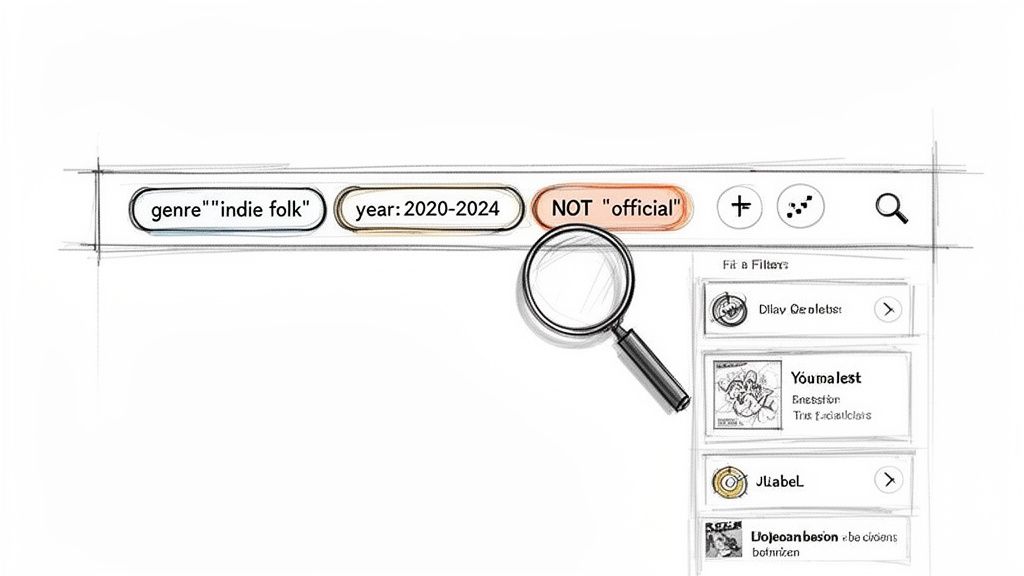
If you really want to master finding playlists on Spotify, it's time to stop thinking like a casual listener and start thinking like a data analyst. That simple search bar is hiding a ton of power, packed with commands that can slash through thousands of useless results and zero in on the exact playlists you need.
These commands are called search operators, and they’re your secret weapon. They act like special instructions for Spotify's search engine. Instead of just vaguely typing "indie folk," you can build a precise query that saves you hours of scrolling and dead ends. It's the difference between casting a giant, messy net and using a laser-guided spear.
Using Operators to Sharpen Your Search
Let's break down the most useful operators. The real magic happens when you start combining these to find playlists that perfectly match your music's genre, vibe, and audience.
This is the most crucial one for targeting a specific sound. Always wrap multi-word genres in quotes, like or . This tells Spotify to look for that exact phrase, not just the individual words.
or I love this one for finding fresh, active playlists. A search like surfaces playlists created this year, while gives you a slightly wider window. It’s a simple way to filter out old, abandoned lists.
This is a killer tactic for discovery. Want to see which playlists are backing artists on an indie label you admire? A search like can instantly show you curators who are plugged into that specific scene.
Think of these operators as building blocks. You can use them on their own, but their true power is unleashed when you start stacking them together to build a hyper-specific, targeted query.
The Real Power Move: Combining Operators with Boolean Commands
This is where your search game gets a serious upgrade. By using , , and , you can layer your operators to include or exclude specific types of playlists, giving you surgical control over your results. The command, in particular, is a lifesaver for cutting out the noise.
Let's say you're an indie folk artist. A basic search is going to give you a mountain of junk to sift through. Instead, you could type this directly into the search bar:
Look at what this one command accomplishes. It tells Spotify you want playlists tagged with the "indie folk" genre AND have the keywords "acoustic chill" somewhere in their title or description. But here’s the most important part: it excludes any playlist with the word "official."
This instantly removes Spotify's own editorial playlists, leaving you with a clean list of user-generated playlists that are a perfect fit for your sound and are actually run by curators you can contact. This is how you work smarter, not harder, to get your music in front of the right people.
How to Use Algorithmic Playlists for Growth
Algorithmic playlists are easily one of the most powerful discovery engines on Spotify, but a lot of artists see them as some kind of mysterious black box. Playlists like Discover Weekly and Release Radar aren't just random song collections; they're intensely personal experiences built on a mountain of listener data. If you can figure out how they tick, you can use them to fuel your own growth.
These playlists work by watching a user's listening habits—what they stream, what they skip, what they save. Spotify’s system then finds patterns between that user and others with similar tastes, creating a unique, personalized mix just for them. For artists, this means the algorithm is always on the hunt for signals that a track is hitting home with real people.
Finding the Algorithmic Triggers
While you can't pitch your music directly to Discover Weekly, you can absolutely influence it. This is a critical insight many artists miss. The algorithm pays incredibly close attention to how your song performs on smaller, user-generated playlists. The right placement on a niche playlist can trigger a massive snowball effect.
Imagine your song gets added to a "Chill Indie Drive" playlist. When listeners on that playlist start saving your song, it sends a powerful signal to Spotify that fans of that specific vibe are connecting with your music. The algorithm takes note and starts testing your track with a wider audience of listeners who follow similar artists and playlists. If it keeps performing well, it can suddenly find itself in thousands of personalized algorithmic playlists.
This entire process is why finding the right independent playlists is so crucial. They are the initial spark that can ignite a much larger fire. To get a deeper dive on this, check out our complete guide to mastering Spotify's algorithmic playlists.
Reverse Engineering Success
One of the smartest ways to find playlists that feed the algorithm is to analyze your own data or that of artists who sound like you.
Hop into your Spotify for Artists dashboard and see which user-generated playlists are already driving streams. These are your proven winners—go find more like them.
Check out the "Discovered On" section on the profiles of similar artists in your genre. This literally shows you the exact playlists that are breaking new artists to their fans.
This reverse-engineering approach helps you zero in on active, influential curators whose playlists are clearly respected by the algorithm. It shifts your focus from just finding any playlist to finding the right playlists that will actually move the needle.
Algorithmic playlists aren't a lottery; they are a direct response to genuine listener engagement. Your goal is to create that initial engagement on smaller playlists, feeding the algorithm the positive data it needs to start recommending your music on a massive scale.
Finding playlists is just the first step—understanding the role they play is what leads to real growth. Algorithmic gems like Discover Weekly have completely changed music discovery since launching back in 2015. Every week, it generates over 56 million new artist discoveries, and a whopping 77% of those go to emerging artists. Listeners have streamed more than 100 billion tracks from it, which shows its immense power. You can discover more insights about this playlist's impact on Hypebot.
Finding and Vetting Playlists with Artist.Tools
Look, manual searches and pure guesswork will only get you so far. Once you’ve got a handle on what a quality playlist looks like, the next move is to scale up how you find and check them. This is where a dedicated platform like artist.tools becomes your best friend, turning hours of mind-numbing research into minutes of focused, smart action. It’s all about finding playlists that will actually move the needle for your music.
The whole process kicks off with targeted discovery. Forget casting a wide, messy net into the Spotify ocean. You need a powerful tool to zero in on exactly what you’re looking for. This is the foundation of building a solid outreach list from the ground up.
Building Your Target List with Playlist Search
Imagine being able to sift through millions of playlists to find the ones that perfectly fit your genre, vibe, and audience. That’s precisely what the Playlist Search feature inside artist.tools is built for. You can instantly filter by genre, keywords, follower count, and even when a playlist was last updated, making sure you’re only chasing active curators.
For instance, an indie pop artist could hunt for playlists using filters like:
Keywords: "dream pop," "bedroom pop," "chill vibes"
Follower Count: Between 5,000 and 20,000 (this is often the sweet spot for engaged, accessible curators)
Last Updated: Within the last 30 days to know it's actively managed
A simple query like this immediately cuts out the dead playlists and mismatched genres, leaving you with a clean, highly relevant list of potential partners. Building your search strategy this way is a total game-changer. You can dive deeper into crafting these searches in our guide on how the Playlist Search tool works.
Vetting Quality with the Playlist Analyzer
Finding a promising playlist is only half the job—vetting its quality is arguably the more critical piece. A playlist with 50,000 followers means nothing if they're all bots. This is where the Playlist Analyzer comes in, giving you the hard data to tell legitimate opportunities from the fraudulent ones that can seriously damage your Spotify profile.
Protecting your music from bot activity is non-negotiable. A spot on a fake playlist gives you zero real engagement and can even get your track flagged by Spotify. Always analyze before you pitch.
The analyzer digs deep into a playlist's history and overall health. The most telling feature? The two-year follower growth chart. A healthy, organic playlist shows a steady, gradual climb in followers. A botted playlist, on the other hand, almost always has sudden, vertical spikes where thousands of followers appear out of nowhere. That’s the biggest red flag you can possibly find.
This is the cycle you're aiming for: legitimate niche playlists trigger algorithmic growth, which can land you on massive playlists like Discover Weekly.
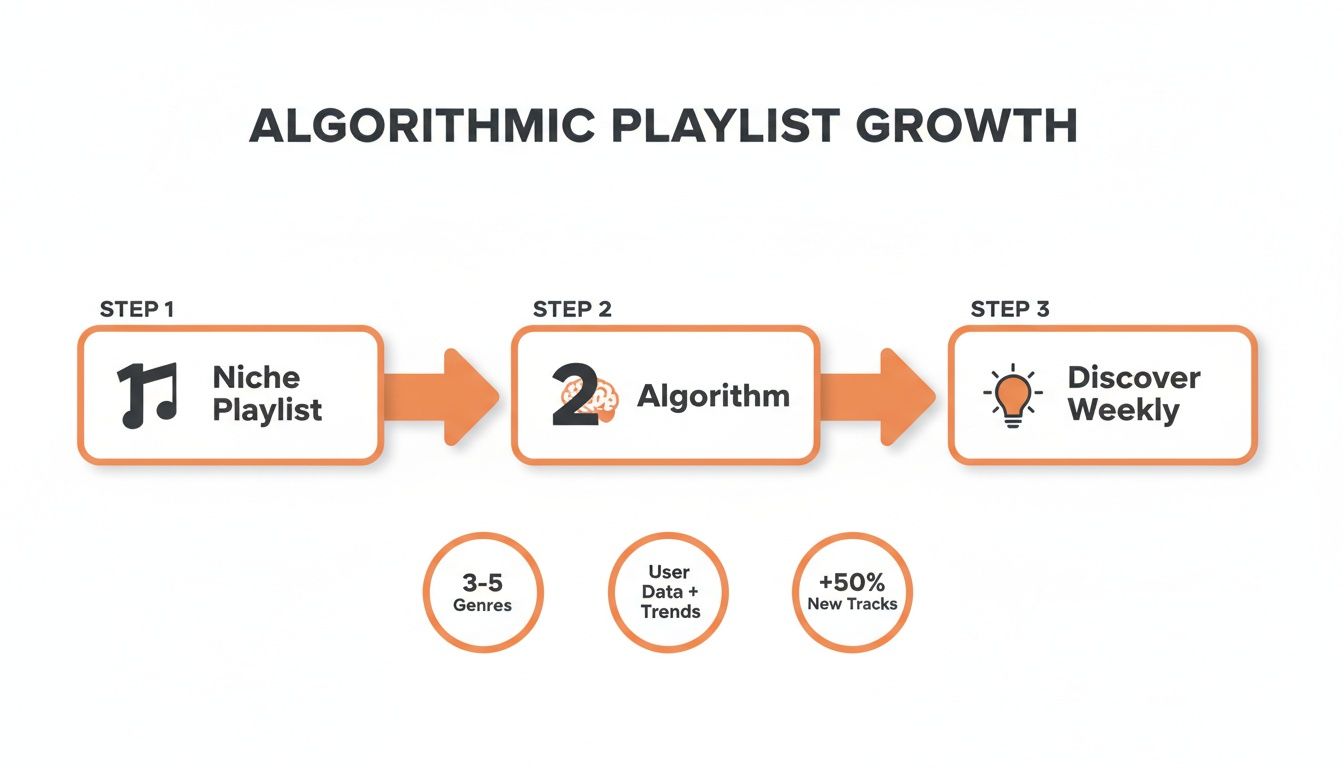
This whole process proves why checking for organic growth is so crucial—it’s the very foundation Spotify's own discovery engines are built on.
The Spotify ecosystem is massive. Listeners have created nearly 9 billion user-generated playlists. And while editorial giants like Today's Top Hits boast over 35+ million followers, a staggering 87% of all tracks on the platform have fewer than 1,000 streams. The Playlist Analyzer helps you cut through all that noise by checking follower charts, identifying curator contacts, and making sure you’re pitching to playlists with real, engaged listeners who can actually make a difference.
Using SEO Insights to Optimize Your Outreach
Finding playlists is one half of the battle. The other half? Getting your music positioned so the right curators find you.
This is where you can flip the script, moving from a reactive "pitch and pray" strategy to a proactive, data-informed one. Instead of just hunting for playlists that look good on the surface, you start by understanding what actual listeners are searching for on Spotify.
The goal is to find curators whose playlists are already winning the discovery game—the ones that pop up when real people look for new music. They've already built a highly engaged, organic audience, and you're about to find out how to tap into it.
Uncover Listener Trends with Keyword Explorer
First things first, you need to know what terms people are typing into that Spotify search bar. The Keyword Explorer tool in artist.tools is your window into this world, showing you the real search volume for specific keywords and which playlists are ranking at the top for them.
Let's say you make ambient electronic music. Your first instinct might be to just search for "ambient." But what if the Keyword Explorer shows you a related term like "focus music for studying" has massive search volume with way less competition?
This insight is gold. It tells you the exact language listeners use to find your kind of music, letting you target playlists that are already optimized for these high-intent searches.
When you understand these search trends, you're not just finding random playlists; you're finding entire niches with built-in audiences ready to listen. This is the foundation of smart Spotify playlist SEO, a crucial part of boosting your music's long-term visibility. For a deeper dive, you can explore our article on boosting visibility with Spotify SEO.
Spotting Emerging Trends with Search Suggestions
Listener habits can change in a heartbeat. A new video game, a viral TikTok trend, or a hit Netflix show can create sudden demand for completely new types of playlists. The Search Suggestions feature is your real-time trend detector for this.
It shows you what Spotify's auto-complete suggests for different keywords, revealing emerging search patterns often before they hit the mainstream. You might see terms like "cyberpunk workout" or "dystopian synthwave" start to appear. This is your signal to get ahead of the curve and find curators who are already building playlists for these fresh, growing niches.
Track Top Performers with Playlist Search Rankings
Okay, so you've identified your golden keywords. Now what? The Playlist Search Rankings tool shows you exactly which playlists are dominating the results for those terms. It's like getting a behind-the-scenes look at the Spotify search algorithm.
With it, you can:
See which playlists consistently hold the top spots.
Track how their rankings fluctuate over time.
Pinpoint the most influential curators in your specific niche.
Getting a handle on Spotify search is absolutely critical, especially when you learn that algorithmic playlists are responsible for over 30% of all new music discoveries. With a staggering 60,000 new songs uploaded every day, just being good isn't enough—you have to be visible.
In 2025, Hip-Hop/R&B alone accounted for 30.7% of all streams, highlighting how crowded specific genres are. This is why using tools like Keyword Explorer to find your specific, data-backed lane is essential. It ensures you're focusing your limited time and energy on playlists with proven, organic reach that will actually move the needle.
Common Questions About Finding Spotify Playlists
Once you start digging into Spotify playlists, a few questions always seem to come up. It's one thing to do a basic search, but it's another to build a real strategy. Here are the clear, no-fluff answers you need to get it right.
How Can I Tell If a Spotify Playlist Is Fake or Botted?
The most telling sign of a fake playlist is its follower growth. A real, healthy playlist grows steadily over time, maybe with small bumps here and there. If you see a graph that suddenly spikes with thousands of new followers overnight, that's a massive red flag for bot activity.
Another dead giveaway? A huge follower count with next to no engagement. A playlist with 50,000 followers that can't even generate a few hundred monthly listeners for its tracks isn't a real opportunity; it's a trap. Same goes for those with generic, keyword-stuffed names that just feel off.
Always be wary of any curator demanding payment for a placement. This practice violates Spotify's terms of service and is a strong indicator of a low-quality or fraudulent playlist that offers no real value.
What Is the Best Way to Find Curator Contact Information?
You can start by checking the playlist description right on Spotify. A lot of curators will drop an email or a submission link there. If that's a dead end, you can try searching for the playlist name or the curator's profile on Instagram or X. Sometimes you get lucky.
But let's be honest, that manual process is a grind and often leads nowhere. This is where a dedicated platform like artist.tools becomes a game-changer. It pulls all that information together, often giving you verified curator contacts right inside its search tools. It can save you countless hours of detective work.
Should I Target Big Playlists or Smaller Niche Ones?
The best strategy is a mix of both, but your starting point is key. Landing on a massive editorial playlist like New Music Friday is the dream, but for most independent artists, it's a lottery ticket. Those spots are incredibly competitive.
Instead, your focus should be on smaller, niche playlists. Think lists with a few thousand highly engaged followers who are genuinely into your specific sound. Getting placed on a handful of these is powerful for two reasons:
You start building a real, foundational audience of people who actually like your music.
You send all the right signals to Spotify's algorithm, showing that your track is gaining organic traction.
This is the kind of momentum that can trigger a placement on algorithmic heavy-hitters like Discover Weekly. Think of smaller playlists as the launchpad, not the final destination. They're how you build your story, one real listener at a time.
Ready to stop guessing and start making data-driven decisions? artist.tools provides the Playlist Search, Analyzer, and SEO insights you need to build a targeted outreach list, vet every opportunity for quality, and find curators with proven organic reach. Start your smarter playlisting strategy today at https://artist.tools.
.png)
Comments