Promote your music safely, bot-free, and policy compliant with SubmitLink (10% OFF)
Advanced Music Search for Spotify Research
TL;DR
artist.tools Advanced Search helps you search across 20M+ artists, tracks, playlists, curators, and keywords, then narrow results with filters built for real music workflows: playlist outreach, curator research, A&R, market analysis, competitor research, playlist SEO, and early trend spotting.
Search Built for Music Research, Not Just Lookup
Most search tools help you find something you already know exists.
artist.tools Advanced Search is built for a different job: finding opportunities you would not have found manually.
You can search across playlists, artists, tracks, curators, and keywords, then filter by the signals that matter in music work: followers, listeners, growth, streams, popularity, release dates, genres, contact availability, playlist quality, bot-risk signals, keyword demand, Spotify search competition, playlist positions, folders, and saved lists.
That makes Advanced Search useful for playlist pitching, A&R, curator research, competitor analysis, market research, playlist SEO, and spotting trends before they become obvious.

What You Can Search
Search Type | Use It For |
Playlists | Find playlist pitching targets, contactable playlists, competitor playlists, active playlists, and playlist trends |
Artists | Research genres, markets, growth signals, total streams, monthly listeners, and A&R opportunities |
Tracks | Find songs by stream range, release date, popularity, artist, ISRC, or momentum |
Curators | Research playlist owners, curator networks, contact opportunities, and playlist quality |
Keywords | Discover Spotify search demand, playlist SEO opportunities, listener intent, and niche trends |
The value is not just that these searches exist. It is that they connect. A keyword can reveal a playlist niche. A playlist can lead to a curator. A curator can lead to more playlists. A track can lead to an emerging artist. An artist can lead to a market trend.
Built Around 20M+ Music Assets
artist.tools includes 20M+ assets across artists, tracks, playlists, curators, and keywords.
That scale matters because good music research depends on comparison. You are rarely asking one isolated question. You are usually asking:
Which playlists in this niche are actually worth contacting?
Which curators control multiple relevant playlists?
Which artists are growing inside a specific genre or country?
Which tracks are moving before the artist fully breaks?
Which keywords show real listener demand?
Which playlists are gaining followers right now?
Which opportunities are clean, relevant, and worth your time?
Advanced Search turns a huge music ecosystem into short, usable lists.
Find Playlists Worth Contacting
Playlist discovery is one of the most practical uses for Advanced Search.
Instead of searching Spotify manually and guessing which playlists matter, you can filter for playlists that match your campaign.
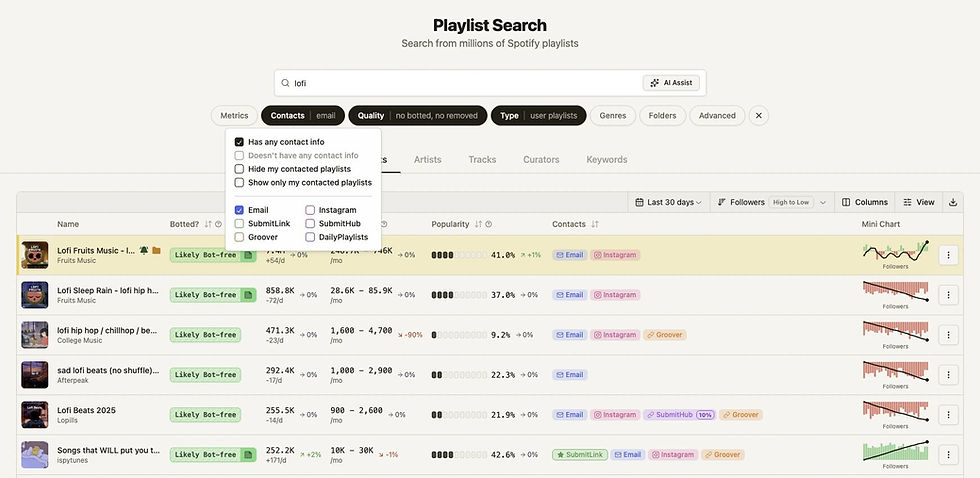
Playlist Filter | Why It Helps |
Followers range | Find playlists with enough visible reach |
Listeners range | Prioritize playlists with stronger audience potential |
Average daily follower growth | Spot playlists gaining momentum |
Newest track date | Find playlists that appear recently active |
Genres | Focus on the right sound or audience |
Contact availability | Find playlists with reachable curator info where available |
Contact type | Narrow by email, Instagram, SubmitHub, Groover, SubmitLink, DailyPlaylists, and more |
Hide botted playlists | Reduce artificial streaming risk |
Hide removed playlists | Keep results cleaner |
Editorial vs. user playlists | Separate Spotify-owned playlists from independent targets |
Folder filters | Include or exclude playlists you have already saved, reviewed, or contacted |
Use this when building playlist outreach lists, checking campaign targets, or researching which playlists are active in a specific niche.
Research Competitor Playlists and Trends
For curators, marketers, and labels, playlist search is also a market research tool.
You can search a genre, mood, activity, or competitor theme, then compare playlists by growth, activity, follower size, contactability, and quality signals.
Use it to answer:
Which playlists are growing fastest in this niche?
Which playlist names and themes keep appearing?
Which genres or moods are becoming more competitive?
Which playlists are still active and adding tracks?
Which competitor playlists appear healthy?
Which curators own multiple playlists in the same lane?
Where is there room for a better playlist concept?
That makes Advanced Search useful as both a Spotify playlist finder and a playlist trend research tool.
Search Artists for A&R and Market Analysis
Artist Search helps you find artists by the signals behind their profile.
You can filter by popularity, followers, monthly listeners, total streams, genre, top demographic country, folders, and specific IDs.
Artist Filter | Example Use Case |
Popularity range | Find artists with current platform momentum |
Followers range | Separate early-stage artists from established acts |
Monthly listeners range | Size artists by current reach |
Total streams range | Find deeper catalog demand |
Genres | Focus research by scene, sound, or niche |
Top country | Research market-specific traction |
Folders | Exclude artists already reviewed or compare saved shortlists |
IDs | Build precise research sets from known artist lists |
For A&R, this is useful because early signals often appear before an artist is obvious from charts alone. You can search for artists matching a specific growth profile, genre, country, and audience size, then save the strongest candidates into folders for follow-up.
Search Tracks to Find Songs Moving Early
Track Search is for finding songs, not just artist profiles.
That matters because a track can move before the artist’s broader profile catches up. A song may be gaining streams, playlist placements, or popularity while the artist is still early.
Track filters include:
popularity range
streams range
release date
recent release presets
ISRC
artist IDs
track IDs
folder inclusion or exclusion
identified AI content where available
Goal | Search Approach |
Find recent songs gaining traction | Filter by release date and sort by popularity or streams |
Research a specific artist’s catalog | Filter by artist ID |
Find high-stream tracks in a lane | Search by context, then filter by stream range |
Track new releases | Use release date presets like last 7 days or last 30 days |
Build A&R watchlists | Save tracks into folders and exclude reviewed sets later |
Match exact recordings | Use ISRC when precision matters |
Track Search is useful for A&R, marketing, catalog research, competitive research, and release monitoring.
Search Curators, Not Just Playlists
A playlist is one opportunity. A curator can represent an entire network.
Curator Search helps you research playlist owners by audience size, playlist network size, playlist listener reach, contact availability, verified status, contacted status, folders, and whether they own risky playlists.
Curator Filter | Why It Helps |
Followers range | Size the curator’s visible audience |
Playlist listener range | Estimate playlist network reach |
Playlist count range | Find one-playlist curators or larger networks |
Contact availability | Prioritize reachable curators |
Verified only | Focus on verified profiles |
Owns botted playlists | Review risky curator networks |
Does not own botted playlists | Focus on cleaner outreach targets |
Hide contacted | Avoid repeating outreach |
Contacted only | Review previous outreach targets |
Folders | Build and refine curator lists over time |
This is especially useful for playlist pitching. Instead of treating each playlist as a one-off, you can understand the curator behind it.
Use Keyword Search to Understand Listener Demand
The Keywords tab is where Advanced Search becomes more than entity discovery.
Keyword Search helps you understand how listeners search for music, moods, activities, genres, and playlist themes.
This is useful for playlist SEO, curator strategy, market research, and spotting listener intent.
You can search and filter keywords by:
Keyword Signal | What It Helps You Understand |
Google search volume | Broader search demand around a term |
Google growth | Whether interest is rising or declining |
Spotify follower reach | How much follower reach exists across top ranking playlists |
Spotify competition | How competitive the keyword is across playlist results |
Spotify playlist growth | Whether ranking playlists are gaining followers |
Momentum tiers | Whether a keyword is surging, breaking out, stable, or declining |
Demand tiers | Whether the keyword has low, steady, high, or huge demand |
Genre focus | Whether top playlists for the keyword are musically focused |
Market | How keyword data differs by country |
Playlist position | Which keywords selected playlists rank for, and where |
Exact include/exclude rules | Build clean keyword sets without noisy matches |
Keyword folders | Save, include, exclude, and revisit keyword research sets |
This is valuable for curators deciding what playlists to build, marketers studying listener language, and artists trying to understand how music is discovered.

Playlist SEO and Keyword Research
Spotify search is its own discovery surface. A playlist can grow because it matches how listeners search: genre, mood, activity, era, scene, setting, or use case.
Keyword Search helps you research that layer.
For example, a curator might compare:
“sad indie”
“dark pop”
“gym rap”
“afrobeats workout”
“study lofi”
“melodic techno”
“country road trip”
“Christian rap”
Then they can look at demand, competition, playlist growth, genre focus, and ranking playlists to decide which angles are worth pursuing.
This is more useful than guessing a playlist name from taste alone. It connects creative positioning to search behavior and competitive context.
A Better Workflow for Playlist Outreach
Use Advanced Search to make playlist outreach cleaner and more disciplined.
Step | What To Do |
1. Start with a niche | Search by genre, mood, artist, keyword, or scene |
2. Filter for fit | Use follower, listener, genre, and activity filters |
3. Reduce risk | Hide botted and removed playlists |
4. Prioritize reachable targets | Filter by contact availability and contact type |
5. Save candidates | Add promising playlists and curators to folders |
6. Avoid duplicate outreach | Hide contacted playlists or curators |
7. Review deeper context | Open playlists and curators before pitching |
This is how a broad Spotify playlist search becomes an actual campaign list.
A Better Workflow for A&R
A&R research often starts with a hunch: a genre, market, sound, playlist scene, similar artist, or track spike.
Advanced Search helps turn that hunch into a repeatable workflow.
Research Question | Search Workflow |
Which artists are growing in this genre? | Artist Search by genre, monthly listeners, popularity, and followers |
Which tracks are moving right now? | Track Search by release date, streams, and popularity |
Which playlists are shaping the scene? | Playlist Search by genre, follower growth, and activity |
Which curators matter here? | Curator Search by playlist count, reach, and quality |
Which keywords define listener demand? | Keyword Search by demand, competition, growth, and genre focus |
Have we already reviewed these names? | Folder include/exclude filters |
The point is not just to find popular artists. It is to find useful signals early enough to act on them.
A Better Workflow for Market Research
Market research is not only about knowing who is big. It is about understanding shape, movement, and opportunity.
Advanced Search helps you map a niche from multiple angles:
Find the artists defining a sound.
Identify tracks gaining traction.
Review playlists driving discovery.
Research curators behind those playlists.
Compare follower and listener ranges.
Study keyword demand and competition.
Save segments into folders for monitoring.
If you are researching a niche like “indie sleaze,” “dark pop,” “Afrobeats workout,” “melodic techno,” or “country road trip,” Advanced Search helps you move between artists, tracks, playlists, curators, and keywords until the market becomes clear.
Why Folders Matter
Search becomes more valuable when it feeds a workflow.
Folders let you save artists, tracks, playlists, curators, and keywords into research lists, then include or exclude those folders in future searches.
Use folders for:
playlist outreach lists
contacted curators
A&R shortlists
competitor playlists
genre watchlists
keyword research sets
campaign targets
risky playlists to avoid
reviewed artists or tracks
market segments you monitor over time
This prevents the classic research problem: finding the same result again and forgetting whether you already reviewed it.

Search Recipes You Can Use
Goal | Search Recipe |
Find playlist contacts for a campaign | Playlist Search by genre, contact info, contact type, and non-botted status |
Find fast-growing playlists | Playlist Search by keyword or genre, sorted by follower growth |
Research competitor curators | Curator Search by playlist count, playlist listeners, and contact availability |
Build an A&R shortlist | Artist Search by genre, monthly listeners, popularity, total streams, and country |
Find recent tracks gaining traction | Track Search by release date, stream range, and popularity |
Analyze a regional scene | Artist Search by top country, then inspect related tracks and playlists |
Research playlist SEO | Keyword Search by demand, competition, momentum, and genre focus |
Clean up outreach | Use contacted-only or hide-contacted filters |
Avoid repeat review | Exclude saved folders from future searches |
What Makes Advanced Search Different
Basic Search | artist.tools Advanced Search |
Finds known names | Discovers unknown opportunities |
Mostly text matching | Text plus metrics, filters, folders, and quality signals |
Single entity type | Artists, tracks, playlists, curators, and keywords |
Hard to manage outreach | Contact filters, contacted status, and folders |
Limited market context | Compare reach, streams, growth, genre, demand, competition, and trends |
Easy to duplicate work | Include/exclude saved folders and reviewed lists |
No keyword intelligence | Search demand, playlist competition, Spotify growth, and market filters |
No risk layer | Playlist quality and bot-risk filters where relevant |
Basic search helps you find something. Advanced Search helps you decide what is worth your time.
Built for Real Music Workflows
User | How Advanced Search Helps |
Artists | Find playlist opportunities, research similar artists, avoid risky placements |
Managers | Build campaign lists, monitor roster context, discover growth opportunities |
Labels | Run A&R research, compare markets, track scenes, review playlist ecosystems |
Marketers | Find reachable playlists and curators, manage outreach, evaluate campaign fit |
Curators | Research competitor playlists, keywords, trends, and genre movement |
A&R teams | Spot artists and tracks showing early signals |
Publicists | Connect artist, track, playlist, and market context before pitching |
Analysts | Segment large music datasets into usable research lists |
The value is not just more data. It is faster, cleaner decision-making.
FAQ
What is artist.tools Advanced Search?
artist.tools Advanced Search is a music research tool for searching across playlists, artists, tracks, curators, and keywords. It helps users filter Spotify-related music assets by metrics like followers, listeners, streams, popularity, release date, genres, contact availability, playlist quality, keyword demand, Spotify competition, and more.
Can I use Advanced Search as a Spotify playlist finder?
Yes. You can use it to find Spotify playlists by genre, keyword, follower range, listener range, growth, contact availability, activity, editorial status, and bot-risk filters.
Can I find playlists to contact?
Yes. Playlist Search includes contact-related filters, including whether a playlist has contact info and which contact types are available where applicable. You can also hide playlists you have already contacted or show only contacted playlists for follow-up.
Can I search artists for A&R?
Yes. Artist Search supports filters like popularity, followers, monthly listeners, total streams, genre, top country, folders, and IDs. This makes it useful for A&R research, market analysis, and early trend discovery.
Can I search tracks by streams or release date?
Yes. Track Search supports stream ranges, popularity ranges, release date filters, recent release presets, ISRC lookup, artist IDs, and folder filters. This is useful for finding songs gaining traction or researching catalog performance.
Can I search curators?
Yes. Curator Search helps you research playlist owners by followers, playlist reach, playlist count, contact availability, verified status, folder status, contacted status, and whether they own risky playlists.
What does Keyword Search do?
Keyword Search helps you research Spotify search demand, playlist SEO opportunities, listener intent, and keyword competition. You can filter by Google volume, Google growth, Spotify follower reach, Spotify playlist growth, demand tiers, competition tiers, momentum tiers, genre focus, market, playlist position, folders, and exact include/exclude rules.
How big is the artist.tools search database?
artist.tools includes 20M+ assets across artists, tracks, playlists, curators, and keywords.
Who is Advanced Search for?
Advanced Search is useful for artists, managers, labels, marketers, playlist curators, A&R teams, publicists, and analysts who need to find opportunities, research markets, spot trends, and make better music decisions.
Is Advanced Search only for playlist pitching?
No. Playlist discovery is one major use case, but Advanced Search also supports artist research, track discovery, curator research, keyword research, market analysis, A&R workflows, competitor research, and trend spotting.
Advanced Analytics, Charts, & Playlist History over 4+ years
Analyze how artists, tracks, playlists, or curators have evolved over time, and whether that evolution is artificial.
.jpg)
.jpg)
Detect Playlist Placements likely to deliver Artificial Streams
Get notified when your music is discovered in playlists likely to deliver artificial streams, the most common source of fraud.
.jpg)
.jpg)
Granular search across 20M+ Spotify assets
Source curator emails, trending artists, AI-generated tracks, & more using highly-granular search filters.
Contacts
Listeners
| >200K
Demographic
| Phillipines
Grow bigger & better playlists with Spotify Search Traffic
Discover underserved search intents that shape your playlist strategy.
meditation mix
12K searches/month
Highly competitive
meditation for adhd
2.9K searches/month
Low competition
Discover where you're being talked about online
Detect online mentions; like press articles, social mentions, & more.
_.jpg)
PRICING
Unlimited artists. Every plan.
bot detection, analytics, & more, on 20M+ assets

GET STARTED
Protect your music career
start for free, upgrade as your career evolves
.png)
artist.tools
A data platform providing comprehensive bot detection, playlist analysis, and curator contact info for artists, labels, and distributors to build & maintain safe & successful careers in the music industry
See why industry leaders like
DistroKid, UnitedMasters, TooLost, ReverbNation, and Ditto recommend artist.tools to their users.
Sister projects:
SubmitLink | PlaylistScaler | SERPclimber
Enterprise Solutions
Trusted Marketing Services
Resources & Free Tools
© 2026 ALW Holdings Inc. All rights reserved.

.png)