Promote your music safely, bot-free, and policy compliant with SubmitLink (10% OFF)
Spotify SEO Tools for Playlist Growth
TL;DR
artist.tools gives you a Spotify SEO workspace for keyword research, playlist search rankings, autocomplete insights, Google visibility, press mentions, backlinks, saved keywords, and SEO workflows across playlists, artists, tracks, curators, and keywords. Use it to find better search opportunities, optimize playlists with real data, track ranking movement, monitor off-platform visibility, and understand where discovery is coming from.
Spotify SEO Tools Built for Music Discovery
Spotify SEO is not just adding a few keywords to a playlist title.
In artist.tools, Spotify SEO means understanding how listeners search, which playlists are ranking, what keywords are growing, where your artists or tracks appear in search results, and how press or backlinks may be shaping discovery outside Spotify.
The SEO toolkit is built around real music workflows:
Finding Spotify keywords worth targeting.
Tracking playlist rankings in Spotify search.
Discovering autocomplete suggestions from Spotify search behavior.
Researching top playlists for any keyword.
Finding SEO opportunities for existing playlists.
Monitoring Google rankings for artists, tracks, playlists, and curators.
Tracking press mentions and backlinks.
Organizing saved keywords, playlists, artists, tracks, and curators into research folders.
artist.tools connects these workflows across 20M+ assets, including artists, tracks, playlists, curators, and keywords.
What You Can Do With Spotify SEO in artist.tools
Feature | What it helps you do | Best for |
Spotify Keyword Search | Find keywords with demand, playlist growth, competition, genre fit, and market data | Playlist SEO, trend research, curator strategy |
Autocomplete Insights | See Spotify search suggestions from listener-style queries | Playlist naming, keyword discovery, market comparison |
Playlist SEO Rankings | Track where a playlist ranks for Spotify keywords over time | Curators, playlist owners, campaign monitoring |
Keyword Pages | Analyze the top playlists ranking for a keyword | Competitor research, playlist optimization |
Spotify Opportunities | Find new keyword angles for an existing playlist | Expanding search reach without guessing |
Google Rankings | See which Google keywords surface artists, tracks, playlists, or curators | Off-platform discovery, artist and release visibility |
Press Mentions & Backlinks | Monitor where entities are referenced or linked across the web | PR tracking, release analysis, authority signals |
SEO & Press Overview | View SEO visibility across saved entities and keyword folders | Managers, labels, analysts, curators |
Saved Keywords & Folders | Organize SEO research by campaign, market, genre, or roster | Ongoing tracking and team workflows |
Spotify Keyword Search
Keyword Search helps you find the Spotify search terms that are actually worth evaluating.

Instead of choosing playlist keywords based on intuition, you can compare keywords by demand, competition, growth, and genre relevance.
This is useful whether you are building a new playlist, improving an existing one, researching a niche, or watching a trend emerge.
Use Keyword Search to evaluate:
Google search volume for broader demand.
Spotify follower reach across top ranking playlists.
Spotify playlist growth across ranking playlists.
Monthly growth rate to find momentum.
Top Spotify genres for listener expectation.
Genre focus to see whether a search term has a clear sound.
Markets to compare country-level behavior.
Keyword folders to save and organize research.
Useful Workflow
Step | Action |
1 | Search a seed term like indie pop, phonk workout, sad country, or chill rap. |
2 | Filter for keywords with relevant genres and realistic competition. |
3 | Sort by Spotify playlist growth or growth rate to find active demand. |
4 | Save promising keywords into a folder for the playlist, artist, release, or market. |
5 | Open the best keywords for deeper playlist and ranking analysis. |
Autocomplete Insights
Autocomplete Insights shows Spotify search suggestions from the way listeners actually phrase searches.
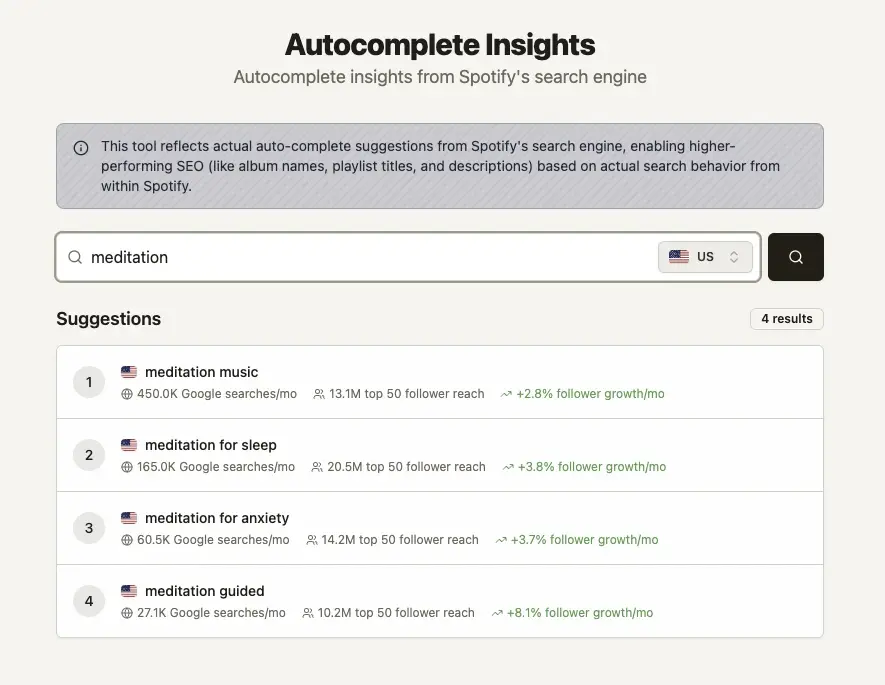
This is useful because curators and marketers often describe music differently than listeners do. A curator might think in genre taxonomy.
A listener might search by mood, activity, season, artist comparison, or moment.
Use Autocomplete Insights to discover:
Mood-based searches.
Activity-based searches.
Genre variations.
Seasonal terms.
Market-specific search language.
Related keyword ideas for playlist names and descriptions.
Good seed searches include:
sad
workout
indie
sleep
driving
country
afrobeats
summer
study
new music
Autocomplete is especially useful before creating a new playlist or renaming an existing one.
Playlist SEO Rankings
The Playlist SEO tab shows where a playlist appears in Spotify search for tracked keywords.

This is where Spotify SEO becomes measurable. You can see whether a playlist is gaining visibility, losing rankings, appearing for new searches, or no longer ranking for terms it used to capture.
Track:
Current Spotify ranking position.
Position history.
Ranking movement.
Newly discovered keywords.
Lost rankings.
Market differences.
Estimated visibility based on ranking position and keyword demand.
Saved keyword performance.
Why This Matters
Without ranking tracking | With ranking tracking |
You guess whether a title or description change helped | You can see if rankings moved |
You manually check Spotify search results | You monitor keywords in one place |
You focus only on follower count | You understand search visibility |
You forget which terms mattered | You save and organize priority keywords |
You react after growth slows | You catch ranking changes earlier |
Keyword Pages
Keyword Pages let you inspect the search result behind a keyword.

For any Spotify keyword, you can analyze the top playlists ranking for that term and see what they have in common.
This helps you understand the competitive landscape before changing your own playlist strategy.
Use Keyword Pages to research:
Top 50 playlists ranking for a keyword.
Playlist position and movement.
Playlist follower counts.
Playlist quality signals.
Genre alignment.
Track overlap.
Playlist title and description patterns.
Other markets where the same playlists rank.
Google search volume and historical demand.
Spotify playlist growth around the keyword.
Example: Before Targeting a Keyword
Ask:
Are the top playlists independent, editorial, branded, or curator-owned?
Do the ranking playlists share a clear genre pattern?
Are they growing, or are they just large?
Does your playlist match what listeners expect from this search?
Is the keyword too broad, too crowded, or actually reachable?
Are there adjacent keywords with better momentum?
The goal is not to copy ranking playlists. It is to understand the search environment before you optimize.
Spotify Opportunities
Spotify Opportunities helps you find keywords an existing playlist could reasonably target.
Instead of starting from a blank search box, artist.tools can suggest keyword angles based on the playlist’s genre context while avoiding terms already used in the playlist name or description.
Use this when:
A playlist has a clear sound but weak search visibility.
You want to expand beyond the obvious keyword.
You need adjacent terms for a title or description refresh.
You are comparing several possible directions for a playlist.
You want to avoid targeting irrelevant or overly broad searches.
Strong opportunities usually combine:
Relevant genre fit.
Real search demand.
Manageable competition.
Active playlist growth.
Natural wording that would make sense to listeners.
Google Rankings
Spotify discovery does not only happen inside Spotify.
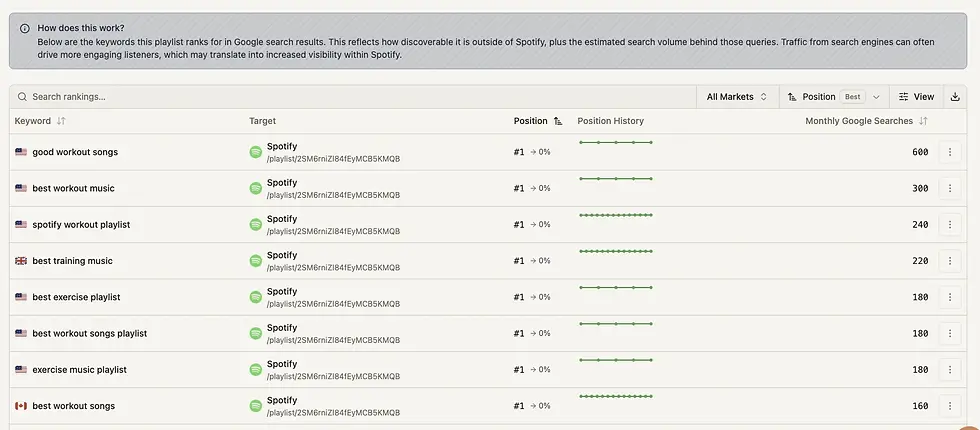
The Google Rankings view shows which Google keywords an artist, track, playlist, or curator ranks for, along with estimated monthly search volume and ranking history.
This helps you understand off-platform visibility around an entity.
Use Google Rankings to see:
Which searches surface an artist.
Which keywords surface a track or release.
Whether a playlist or curator is discoverable outside Spotify.
How rankings change after press, campaigns, or playlist growth.
Which pages or results are connected to search visibility.
This is useful for artists, managers, labels, PR teams, and curators who need a broader view of discovery than Spotify stats alone can provide.
Press Mentions and Backlinks
Press Mentions and Backlinks help you understand where an artist, track, playlist, or curator is being referenced across the web.

That context matters because campaigns often create signals outside the streaming platform first: articles, reviews, playlist posts, blogs, chart pages, curator pages, and other mentions.
Track:
Press mentions.
Backlinks.
Unique referring domains.
Pages referencing an entity.
Visibility changes over time.
Coverage connected to a release or campaign.
Useful For
Team | Use case |
Artist managers | Track whether press is building visibility around an artist |
Labels | Review campaign coverage after a release |
PR teams | Check which mentions and links were captured |
Curators | Understand where playlist brands are being referenced |
Analysts | Connect off-platform discovery with streaming or playlist movement |
SEO & Press Overview
The SEO & Press Overview gives you a broader view across the artists, tracks, playlists, and curators you have saved.

Instead of opening each entity one by one, you can monitor SEO visibility from the folders and saved assets that matter to your workflow.
Use it to track:
Saved playlists and their Spotify keyword visibility.
Saved artists, tracks, curators, and their Google rankings.
Backlink and press visibility.
Keyword ranking changes.
Saved keyword performance.
SEO movement across a roster, campaign, or folder.
This is especially useful for teams managing multiple releases, multiple playlists, or a roster of artists.
Saved Keywords and Folders
Spotify SEO becomes more useful when it is organized.
artist.tools lets you save keywords and group them into folders so you can track research over time.
Saved keywords appear across relevant tables, making it easier to spot priority terms while working.
Folder ideas:
Release campaign keywords.
Playlist SEO targets.
Artist positioning.
Genre research.
Seasonal trends.
Competitor playlist terms.
A&R watchlists.
Market-specific keyword sets.
Saved keywords turn one-off research into a repeatable SEO workflow.
Use Cases
For Playlist Owners and Curators
Use artist.tools to find playlist keywords, optimize playlist positioning, and track ranking movement.
A typical workflow:
Search for keywords around the playlist’s genre, mood, or use case.
Compare demand, growth, competition, and genre focus.
Open keyword pages to study ranking playlists.
Save the best keyword targets.
Update the playlist title, description, or curation where it makes sense.
Track Spotify rankings over time.
Use Opportunities to find adjacent keywords.
For Artists and Managers
Use artist.tools to understand how an artist or release is being discovered across Spotify-adjacent search, Google search, playlists, and press.
A typical workflow:
Save priority artists and tracks.
Monitor Google keyword rankings.
Review press mentions and backlinks.
Analyze playlist placements and related keywords.
Watch keyword and visibility changes after a release.
Compare search visibility against streaming and playlist movement.
For Labels
Use artist.tools to track SEO and discovery signals across a roster.
A typical workflow:
Organize artists, tracks, and playlists into folders.
Monitor Google rankings and press visibility.
Track playlist SEO for owned or partner playlists.
Save priority keywords by campaign.
Review ranking changes after marketing pushes.
Use keyword and playlist data for market research.
For A&R and Market Research
Use artist.tools to spot early movement in genres, moods, playlist categories, and search behavior.
A typical workflow:
Search emerging genre or mood terms.
Sort by Spotify playlist growth and growth rate.
Check top ranking playlists and track overlap.
Compare markets.
Save fast-moving keywords into watchlists.
Monitor artists, tracks, and curators connected to those trends.
For PR and Campaign Teams
Use artist.tools to connect search visibility with coverage.
A typical workflow:
Save the artist, track, playlist, or curator connected to the campaign.
Monitor press mentions and backlinks.
Check Google ranking changes.
Review which search terms are appearing around the entity.
Compare visibility before and after launch.
Use the findings to guide follow-up pitching or reporting.
Spotify SEO Workflows You Can Build
Workflow | Tools to use | Outcome |
Build a new SEO-focused playlist | Keyword Search, Autocomplete, Keyword Pages | Choose a playlist concept with real demand and realistic competition |
Improve an existing playlist | Playlist SEO Rankings, Opportunities, Keyword Pages | Find better target keywords and monitor ranking movement |
Track playlist search performance | Saved Keywords, Playlist SEO Rankings, SEO Overview | See which keywords are gaining or losing visibility |
Research a music niche | Keyword Search, Keyword Pages, Track Overlap, Genre Focus | Understand what is growing and what listeners expect |
Monitor release visibility | Google Rankings, Press Mentions, Backlinks, Track Analytics | See how a release appears across search and coverage |
Watch competitor playlists | Keyword Pages, Playlist Analyzer, Ranking History | Study ranking movement, curation patterns, and keyword strategy |
Build an A&R trend list | Keyword Search, Growth Filters, Saved Folders | Track fast-moving genres, moods, and playlist categories |
What Makes artist.tools Different
artist.tools is not just a Spotify keyword list.
It connects Spotify SEO to the surrounding discovery system: playlists, curators, tracks, artists, keywords, Google rankings, press coverage, backlinks, folders, and ranking history.
That matters because music discovery is rarely explained by one metric. A playlist might grow because its Spotify rankings improved. A track might gain attention because press coverage created search demand. A curator might matter because their playlists rank across multiple keywords. A keyword might look small in search volume but show strong Spotify playlist growth.
artist.tools helps you see those connections.
FAQ
What is Spotify SEO?
Spotify SEO is the process of improving and tracking visibility in Spotify search and related search environments. For playlists, it includes keyword research, title and description strategy, genre fit, curation, and ranking tracking. For artists, tracks, and curators, it can also include Google rankings, press mentions, and backlinks.
Is Spotify SEO only for playlists?
No. Playlist SEO is the most direct use case because playlists can rank for Spotify search terms. But artist.tools also supports SEO workflows for artists, tracks, curators, press visibility, Google rankings, and saved keyword research.
Can artist.tools show Spotify keyword rankings?
Yes. For playlists, artist.tools can show Spotify keyword rankings, ranking history, movement, markets, saved keyword visibility, and related keyword metrics.
How do I find Spotify keywords?
Use Keyword Search and Autocomplete Insights. Start with a genre, mood, activity, artist style, or playlist concept, then evaluate keywords by demand, Spotify playlist growth, follower reach, competition, genre focus, and market.
What are Spotify SEO opportunities?
Spotify SEO opportunities are keyword ideas that may fit an existing playlist but are not already obvious from the playlist’s current name or description. They help you find adjacent search angles without starting from scratch.
Why does artist.tools include Google rankings?
Google search can reveal off-platform discovery around artists, tracks, playlists, and curators. It is useful for understanding broader visibility, press impact, and search demand beyond Spotify.
Do backlinks or press mentions guarantee Spotify growth?
No. They should be treated as context, not guarantees. Press mentions and backlinks can show where attention is forming around an entity, but they are one part of a larger discovery picture.
Who should use Spotify SEO tools?
Playlist owners, curators, artists, managers, labels, PR teams, analysts, and A&R teams can all use Spotify SEO data to make better decisions about search visibility, playlist strategy, campaign tracking, and market research.
Advanced Analytics, Charts, & Playlist History over 4+ years
Analyze how artists, tracks, playlists, or curators have evolved over time, and whether that evolution is artificial.
.jpg)
.jpg)
Detect Playlist Placements likely to deliver Artificial Streams
Get notified when your music is discovered in playlists likely to deliver artificial streams, the most common source of fraud.
.jpg)
.jpg)
Granular search across 20M+ Spotify assets
Source curator emails, trending artists, AI-generated tracks, & more using highly-granular search filters.
Contacts
Listeners
| >200K
Demographic
| Phillipines
Grow bigger & better playlists with Spotify Search Traffic
Discover underserved search intents that shape your playlist strategy.
meditation mix
12K searches/month
Highly competitive
meditation for adhd
2.9K searches/month
Low competition
Discover where you're being talked about online
Detect online mentions; like press articles, social mentions, & more.
_.jpg)
PRICING
Unlimited artists. Every plan.
bot detection, analytics, & more, on 20M+ assets

GET STARTED
Protect your music career
start for free, upgrade as your career evolves
.png)
artist.tools
A data platform providing comprehensive bot detection, playlist analysis, and curator contact info for artists, labels, and distributors to build & maintain safe & successful careers in the music industry
See why industry leaders like
DistroKid, UnitedMasters, TooLost, ReverbNation, and Ditto recommend artist.tools to their users.
Sister projects:
SubmitLink | PlaylistScaler | SERPclimber
Enterprise Solutions
Trusted Marketing Services
Resources & Free Tools
© 2026 ALW Holdings Inc. All rights reserved.
.jpg)

.png)