Promote your music safely, bot-free, and policy compliant with SubmitLink (10% OFF)
Spotify Playlist Curator Contact List 2026
artist.tools helps you build Spotify playlist curator contact lists from real playlist and curator records, then filter, review, save, and export contact data as CSV. Use it to find playlist contacts by genre, contact type, audience size, curator profile, playlist quality, and outreach status instead of working from a stale spreadsheet.
Build a Better Spotify Playlist Curator Contact List
A playlist contact list is only useful if the contacts are relevant.
A giant spreadsheet of random Spotify playlist contacts might look valuable at first, but it usually creates more work: outdated links, mismatched genres, playlists with no real audience, duplicate curators, missing context, or contacts you have already reached out to.
artist.tools is built for a more practical version of this workflow.
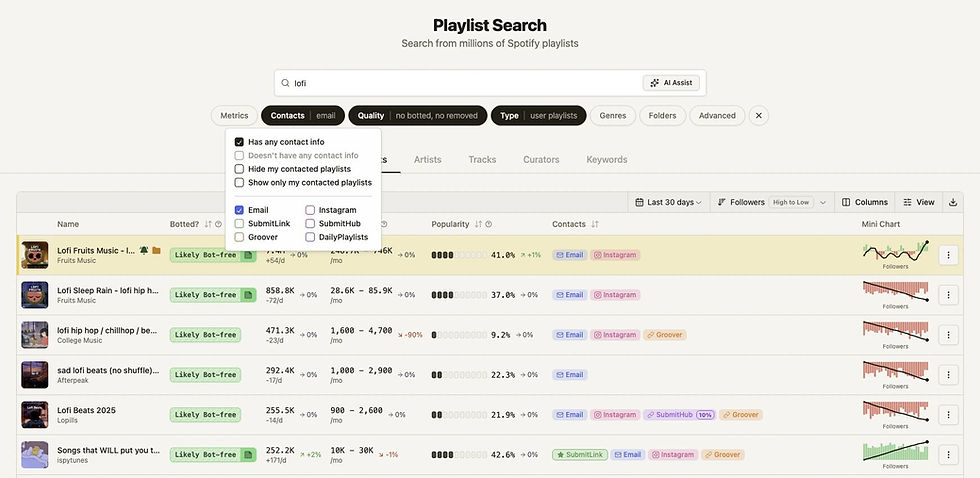
Instead of starting with a static playlist curator contact list, you can search across playlists and curators, filter down to the records that actually fit your campaign, review the surrounding data, and export the contact fields you need.
What You Can Export
artist.tools includes 158K+ playlist and curator contacts, including:
Contact type | Use case |
Direct playlist contact outreach when a public email is available. | |
Social-first curator research and relationship building. | |
SubmitLink | Curator submission workflows through SubmitLink. |
SubmitHub | Submission-based curator outreach where supported. |
Groover | Campaign workflows for curators using Groover. |
DailyPlaylists | Playlist contact and submission workflows where available. |
The goal is not just to collect as many playlist contacts as possible. The goal is to build a contact list you can actually use.
Contact Lists Built From Search, Not Guesswork
A useful playlist contact list should answer more than “what is the email?”
It should also tell you:
What playlist is this contact connected to?
Who owns or manages it?
How large is the playlist?
Does it have estimated listener data?
What genres does it appear to serve?
Is the playlist still active?
Does it show signs of suspicious or artificial growth?
Have you already contacted it?
Does the curator manage other playlists?
Is this worth adding to your outreach list?
artist.tools connects contact data with the surrounding playlist and curator context, so you are not exporting blind.
Search Playlist Contacts by Contact Type
If you need a specific kind of playlist contact list, you can filter for it directly.
Filter | What it helps you find |
Has any contact info | Playlists with at least one available contact method. |
Playlists or curators with email contact data. | |
Playlist contacts with Instagram handles or links. | |
SubmitLink | Curators using SubmitLink workflows. |
SubmitHub | Curators with SubmitHub contact paths. |
Groover | Curators with Groover contact paths. |
DailyPlaylists | Playlists connected to DailyPlaylists workflows. |
Hide contacted | Remove playlists you have already reached out to. |
Contacted only | Review your existing playlist outreach history. |
This makes it easier to build separate contact lists for different workflows: email outreach, Instagram outreach, platform-based submissions, or follow-up management.
Find Contacts That Fit the Music
A playlist contact is not valuable just because it exists.
The best contact list is filtered around fit.
You can narrow playlist contacts by:
Playlist keyword
Genre
Follower range
Listener range
Average daily follower growth
Newest track added date
Contact method
Playlist quality signals
Removed or unavailable playlists
Editorial vs. non-editorial playlists
Specific playlist IDs
Specific curator or owner IDs
Track or artist presence
Saved folders
Contacted status
That lets you build a playlist contact list for a specific campaign instead of exporting a broad, messy database.
Example searches:
Goal | Useful filter direction |
Find indie pop playlist contacts | Search “indie pop,” filter for contact info, exclude removed playlists. |
Build an email-only list | Filter for Email contacts and export the results. |
Avoid repeat outreach | Turn on “Hide my contacted playlists.” |
Find safer outreach targets | Filter out removed playlists and review playlist quality data. |
Find active curators | Sort by follower growth or recent playlist activity. |
Build a genre-specific list | Combine keyword search, genre filters, and contact type filters. |
Playlist Contacts and Curator Contacts
artist.tools gives you two useful ways to build contact lists.
Playlist Contact Lists
Playlist records are useful when you care about a specific playlist.
A playlist export can include fields like:
Playlist name
Owner name
Owner Spotify ID
Owner Spotify URL
Follower count
Listener estimates
Popularity
Quality score
Botted or abandoned indicators
Track count
Newest track added date
Top audience
Genres
Contact fields
Notes
Spotify URL
Spotify URI
Spotify ID
This is useful when you want a playlist-by-playlist outreach sheet.
Curator Contact Lists
Curator records are useful when you care about the person or profile behind multiple playlists.
A curator export can include fields like:
Curator name
Followers
Following count
Listener estimates
Playlist count
High-risk playlist count
Playlist follower reach
Verified status
Private status
Contact fields
Notes
Spotify URL
Spotify URI
Spotify ID
This is useful when you want to understand the broader curator profile before reaching out.
Export Playlist Contacts as CSV
When you have the right filtered view, export the visible contact list as a CSV.
That gives your team a clean spreadsheet for:
Outreach planning
Campaign tracking
CRM import
Email research
Playlist research
Curator review
Follow-up lists
Team handoff
Reporting
CSV export is especially useful when you want to move from discovery into execution without manually copying playlist names, curator names, Spotify URLs, contact fields, and notes one by one.
Keep Track of Who You Already Contacted
The biggest problem with playlist contact lists is that they get messy quickly.
artist.tools lets you mark playlists and curators as contacted, then use that status later while searching.
You can:
Mark a playlist as contacted
Mark a curator as contacted
Hide contacted playlists from future searches
Show only contacted playlists
Review contacted records in your dashboard
Use folders to organize outreach lists
Add notes for campaign context
This turns a contact list into an actual outreach workflow.
Contact List Quality Matters
A large playlist contact list is not automatically a good playlist contact list.
Before exporting, check whether the playlist or curator makes sense for the campaign.
Check | Why it matters |
Genre fit | Reduces irrelevant outreach and improves personalization. |
Follower count | Helps prioritize reach, but should not be the only signal. |
Listener estimates | Adds context beyond public follower counts. |
Recent activity | Helps avoid stale playlists. |
Quality signals | Helps avoid risky or suspicious playlist environments. |
Curator profile | Shows whether the contact manages more than one relevant playlist. |
Contact method | Lets you choose the right outreach channel. |
Contacted status | Prevents duplicate outreach from your team. |
The strongest contact lists are focused, current, and filtered around real campaign fit.
Example Contact List Workflows
Build an Email Contact List
Search for the target genre or playlist keyword.
Filter for playlists with contact info.
Select Email as the contact type.
Exclude removed playlists.
Review playlist quality and audience signals.
Save strong prospects to a folder.
Export the list as CSV.
Build an Instagram Contact List
Search for playlist keywords that match the release.
Filter for Instagram contacts.
Sort by follower count, listener data, or growth.
Review playlist names and curator profiles.
Mark irrelevant records as skipped or leave them out.
Export only the contacts worth reviewing.
Build a Curator Contact List
Switch to Curator Search.
Filter for curators with contact info.
Use playlist count, follower reach, listener range, and quality filters.
Review whether the curator owns relevant playlists.
Save or export the curator list.
Mark contacted curators as your team works through the list.
Build a Clean Follow-Up List
Open contacted playlists or curators.
Filter by folder, genre, or contact type.
Review notes and previous outreach context.
Export the follow-up list.
Remove contacts that are no longer relevant.
Why artist.tools Is Different From a Static Contact Spreadsheet
A spreadsheet can only tell you what was true when the sheet was made.
artist.tools is built around searchable playlist and curator records, so your contact list can be filtered with context before export.
Static contact spreadsheet | artist.tools contact workflow |
Fixed list of contacts | Searchable playlist and curator database |
Limited playlist context | Playlist, curator, audience, quality, and contact context |
Hard to filter by real fit | Filter by genre, contact type, size, listener data, quality, and status |
Easy to contact the same playlist twice | Mark contacted and hide contacted records |
Hard to update team workflows | Use folders, notes, dashboard views, and CSV exports |
Usually focused on email only | Email, Instagram, SubmitLink, SubmitHub, Groover, DailyPlaylists |
Best Practices for Using Playlist Contact Lists
A good playlist contact list still needs a thoughtful outreach process.
Use contact data responsibly:
Contact only playlists that are genuinely relevant.
Personalize the message to the playlist or curator.
Do not send the same generic message to hundreds of contacts.
Do not imply guaranteed placement or payment.
Keep outreach short and respectful.
Avoid repeated follow-ups.
Track who you contacted.
Remove contacts that are not a fit.
Prioritize quality and relevance over volume.
artist.tools helps you build the list. The quality of the outreach still matters.
What This Page Is For
This page is for artists, managers, labels, and marketing teams looking for:
Spotify playlist curator contact lists
Playlist contact lists
Spotify playlist contacts
Playlist curator contacts
Spotify curator contact lists
Exportable playlist contact data
CSV exports for playlist outreach
Contact lists with genre and quality filters
A better way to organize playlist and curator outreach
It is not a guarantee of playlist placement, curator response, or campaign results.
FAQ
Does artist.tools have a Spotify playlist curator contact list?
Yes. artist.tools includes playlist and curator contact data that can be searched, filtered, reviewed, saved, and exported as CSV.
What contact types are available?
artist.tools supports contact fields including Email, Instagram, SubmitLink, SubmitHub, Groover, and DailyPlaylists where available.
Can I export playlist contacts?
Yes. You can export playlist and curator records as CSV, including contact fields and supporting context like Spotify URLs, playlist metadata, audience data, quality signals, and notes.
Can I filter for email-only playlist contacts?
Yes. Playlist Search includes contact filters, including Email, Instagram, SubmitLink, SubmitHub, Groover, and DailyPlaylists.
Can I find curator contacts, not just playlist contacts?
Yes. You can export playlist and curator records as CSV, including contact fields and supporting context like Spotify URLs, playlist metadata, audience data, quality signals, and notes.
How many playlist and curator contacts are in artist.tools?
artist.tools lists 158K+ playlist and curator contacts, including 66K+ Instagram handles, 35K+ emails, and 57K+ other contact methods.
Is this just a spreadsheet?
No. artist.tools is more than a static playlist contact list. You can search, filter, review, save, mark contacted, organize into folders, and export contact data from a broader music database.
Does a contact list guarantee playlist placement?
No. A contact list helps you find relevant contacts and organize outreach. It does not guarantee that a curator will respond or add a track.
Can I track which playlists I already contacted?
Yes. You can mark playlists and curators as contacted, hide contacted records from future searches, or show only contacted records when reviewing outreach history.
Should I contact every playlist with an email?
No. The best results come from focused, relevant outreach. Use filters and playlist context to build a smaller, better contact list instead of sending generic messages to everyone.
Advanced Analytics, Charts, & Playlist History over 4+ years
Analyze how artists, tracks, playlists, or curators have evolved over time, and whether that evolution is artificial.
.jpg)
.jpg)
Detect Playlist Placements likely to deliver Artificial Streams
Get notified when your music is discovered in playlists likely to deliver artificial streams, the most common source of fraud.
.jpg)
.jpg)
Granular search across 20M+ Spotify assets
Source curator emails, trending artists, AI-generated tracks, & more using highly-granular search filters.
Contacts
Listeners
| >200K
Demographic
| Phillipines
Grow bigger & better playlists with Spotify Search Traffic
Discover underserved search intents that shape your playlist strategy.
meditation mix
12K searches/month
Highly competitive
meditation for adhd
2.9K searches/month
Low competition
Discover where you're being talked about online
Detect online mentions; like press articles, social mentions, & more.
_.jpg)
PRICING
Unlimited artists. Every plan.
bot detection, analytics, & more, on 20M+ assets

GET STARTED
Protect your music career
start for free, upgrade as your career evolves
.png)
artist.tools
A data platform providing comprehensive bot detection, playlist analysis, and curator contact info for artists, labels, and distributors to build & maintain safe & successful careers in the music industry
See why industry leaders like
DistroKid, UnitedMasters, TooLost, ReverbNation, and Ditto recommend artist.tools to their users.
Sister projects:
SubmitLink | PlaylistScaler | SERPclimber
Enterprise Solutions
Trusted Marketing Services
Resources & Free Tools
© 2026 ALW Holdings Inc. All rights reserved.

Spotify Playlist Curator Contact List
Spotify Playlist Curator Contact List 2026
Access the latest Spotify playlist curator contact lists, featuring top curators and playlist influencers to boost your music promotion. Discover reliable contact lists, curators, and playlisters to expand your reach on Spotify.
.png)