
Your Spotify Playlist Link: From Copy to Conversion
Learn how to find, share, and track your Spotify playlist link across all devices. This guide covers link types, embedding, and using data to drive real growth.
User-generated playlists drive 36% of all content hours consumed on Spotify, with 2.5 times the impact of editorial playlists combined, according to Soundcharts’ Spotify analytics research. That single fact changes how to think about a spotify playlist link. It isn’t a convenience feature. It’s a distribution asset tied directly to discovery, retention, and long-tail streaming.
Most artists treat the link as the last step. Copy, paste, post, hope. That’s backwards. The link is where the strategy starts, because every playlist share carries signals about intent, audience fit, legitimacy, and search visibility.
A serious operator looks at a playlist link in three ways at once. First, as a listener pathway. Second, as a metadata container shaped by the playlist’s title, description, and public status. Third, as an intelligence object that can be inspected before you pitch music to it or route traffic toward it.
The Power of a Single Playlist Link
A spotify playlist link can keep working long after a campaign post disappears. Social posts decay fast. Playlist links don’t, especially when they point into playlists that listeners save, revisit, and share with each other.
The practical consequence is simple. If your music lands in playlists with real listener behavior behind them, the link becomes repeatable infrastructure. It can live in a bio, press kit, email footer, landing page, fan text blast, or QR-style offline moment without losing strategic value.
Why the link matters more than the share button
A playlist URL looks simple on the surface, but the object behind it is rich. Spotify’s playlist links follow the canonical structure , and the playlist ID is a unique 22-character Base62 string created through Spotify’s API when the playlist is made via the Create Playlist for User endpoint in Spotify’s developer documentation.
That matters because the link is persistent enough to support a real workflow. Curators use it to distribute traffic. Artists use it to judge whether a playlist is worth pitching. Marketers use it to track where clicks originate. Developers and analysts use the playlist ID to connect the playlist to internal tools, embeds, and reporting pipelines.
What works and what doesn’t
Mass posting the same playlist URL everywhere rarely works. Contextual placement works. A link inside a page about your genre works better than a random story slide. A link attached to a playlist with a clear promise works better than one named with vague branding. A public playlist that opens cleanly on every device works better than one that throws an availability error.
Strong playlist link execution usually comes down to a short set of decisions:
- Use a clear playlist concept: A listener should know what they’ll hear before clicking.
- Keep the destination public: A shareable link to a non-public playlist creates friction immediately.
- Match placement to intent: Bio links, EPK placements, and newsletter mentions each serve different audiences.
- Audit before outreach: Never submit your track to a playlist just because someone sent a Spotify URL.
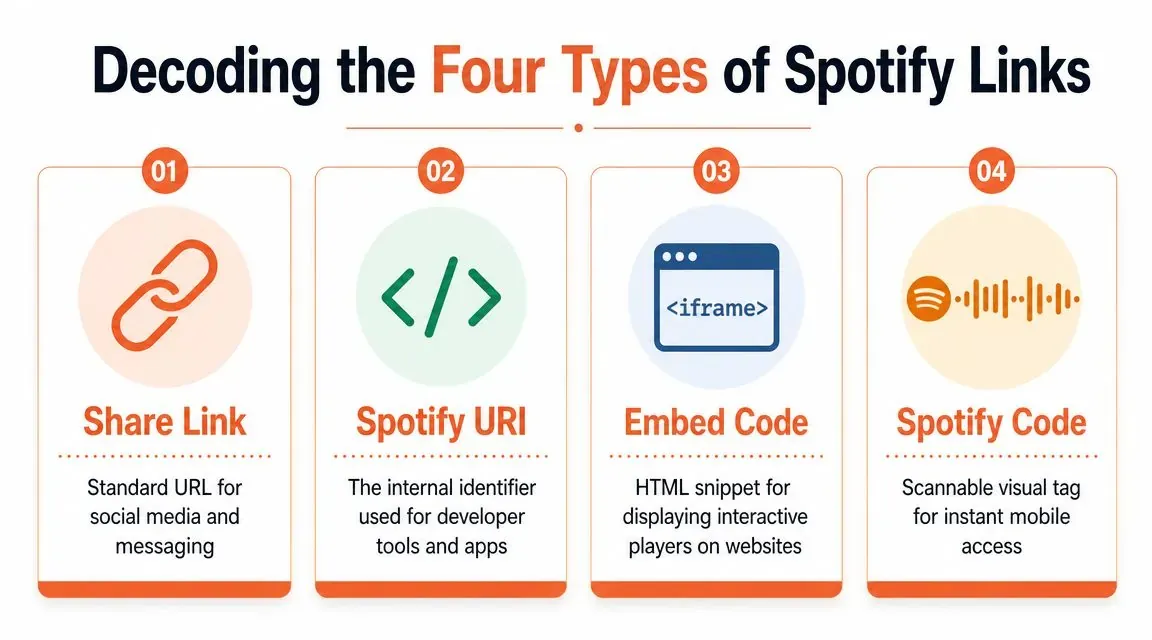
Decoding the Four Types of Spotify Links
Each Spotify link format serves a different distribution job. Artists lose reach when they send a URI to a curator, paste an embed where a clean URL should go, or print a standard link on physical promo instead of using a scannable code. Small format mistakes create real friction, and friction costs plays, saves, and playlist adds.
A standard spotify playlist link usually looks like , with acting as the playlist’s unique identifier. That public URL is the format fans and most curators expect. It is also only one part of the full link toolkit.
The decision framework
| Link Type | Structure | Primary Use Case | Best For |
|---|---|---|---|
| Share Link | Direct listener sharing | Social posts, DMs, email, bios | |
| Spotify URI | Internal app and developer workflows | API tools, deep integrations, advanced ops | |
| Embed Code | HTML iframe snippet | Interactive on-site playback | Websites, press pages, EPKs |
| Spotify Code | Scannable visual code | Mobile-first offline access | Posters, flyers, merch, live events |
Share link and URI
The share link is the default choice for public distribution. It opens in a browser, can hand off to the Spotify app, and works across social posts, press outreach, newsletters, and text messages. If a human is clicking, send this version first.
The Spotify URI is built for software and internal workflows. It is useful in databases, automations, analytics pipelines, and app-level integrations where you need Spotify’s native object format instead of a public web address. At artist.tools, this distinction matters in real execution. Human-facing campaigns need links that open cleanly everywhere. Reporting systems and tooling need identifiers that stay structured and easy to parse.
A simple rule keeps teams out of trouble. Send a URL to people. Send a URI to systems.
Embed code and Spotify Code
The embed code belongs on owned web properties. Use it on an artist site, release page, media kit, or playlist landing page when on-page playback helps conversion. The trade-off is straightforward. Embeds reduce the extra click, but they can load slowly on weak mobile connections and they give you less control over the surrounding user experience than a dedicated landing page.
The Spotify Code is built for offline and mobile-first discovery. It works best anywhere a listener can scan quickly from a phone: venue posters, tour flyers, merch inserts, table tents, street team materials, or retail signage. It is less effective in small digital placements where a normal clickable link is faster.
For teams handling multi-channel promotion, this guide to sharing Spotify music professionally is a useful companion because it covers how these formats behave across real distribution surfaces.
Which one to use
Use this shorthand:
- Bio, DM, email, press outreach, newsletter: standard share link
- Website, EPK, release hub: embed code
- Internal tooling, analytics, automations: Spotify URI
- Print, live events, merch, in-person promotion: Spotify Code
The strategic point is simple. A playlist link is not a single asset. It is a distribution system with four formats, and each one supports a different growth channel. Teams that treat them correctly waste less traffic and get cleaner attribution.
Finding and Copying Your Playlist Link
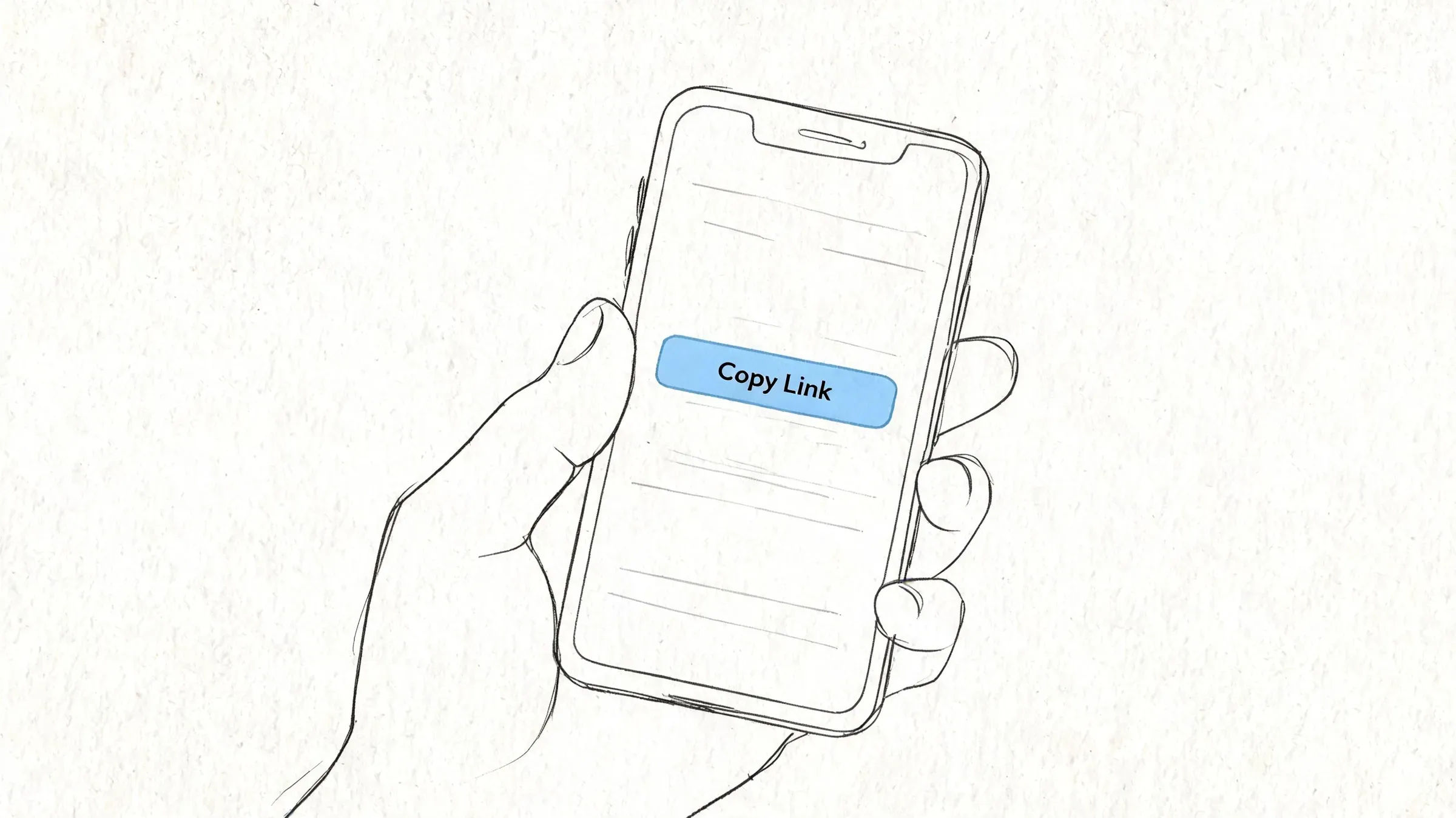
Copying a spotify playlist link should take seconds, not a scavenger hunt through menus. The exact clicks vary by platform, but the goal is always the same: get the public playlist URL and verify that it opens correctly before you share it.
On desktop
Open the playlist in the Spotify desktop app. Click the three-dot menu. Go to Share, then select the option to copy the playlist link.
If you want to be extra careful, paste it into a browser immediately and confirm the playlist opens. That quick check catches bad copies, wrong playlists, and private-status mistakes before they reach fans or curators.
In the web player
Open Spotify in your browser and go to the playlist. Click the three-dot menu near the playlist header, choose Share, and copy the link.
The browser version is useful when you’re already building landing pages, press notes, or release emails. It also makes it easy to paste the URL straight into a document or CMS without app switching.
On iPhone and Android
Open the playlist in the mobile app. Tap the three-dot menu, then tap Share and choose the copy option.
On mobile, pay attention to what you’re copying. Spotify often offers several share routes in the same area, and it’s easy to send directly into another app when you intended the raw link. If you need a broader walkthrough for sharing Spotify assets across platforms, this guide on how to share Spotify music like a pro in 2026 is useful.
A fast verification habit
Before distributing the link, check three things:
- Open behavior: Paste it into a browser and confirm it resolves cleanly.
- Playlist visibility: Make sure the playlist is public if the audience is meant to access it.
- Destination accuracy: Confirm you copied the playlist link, not a track, album, or collaborative invite.
That last mistake is common, especially when moving fast on mobile.
Strategic Link Distribution for Audience Growth
A playlist link becomes more valuable when it is tied to a specific listener action. The same URL can function as a discovery asset, a credibility signal, or a retention tool, depending on where it appears and what the listener expects when they click.
Artists often treat playlist distribution like a volume problem and spread one link across every channel. That usually muddies performance. A playlist link works harder when each placement has a job. One link might introduce new listeners from a press hit. Another might keep existing fans engaged through a themed catalog playlist. A curator link inside an EPK does something different from a playlist link in a fan Discord.
Match the link to the audience stage
Early discovery placements should answer a simple question fast: why should this listener care? If the playlist is built around a scene, mood, or release moment, place it next to that context. A “best new indie folk” playlist belongs in a release recap, newsletter feature, or creator collaboration where the framing is already clear. Generic feed drops rarely carry enough context to earn a high-quality click.
Mid-funnel placements are different. Here, the goal is to convert interest into deeper listening. Owned landing pages, artist websites, and smart-link hubs are stronger options because they let you control the surrounding message, segment traffic, and measure which channel sends listeners who stay engaged.
That measurement piece matters.
Raw Spotify URLs are fine for one-off sharing, but they limit attribution. Professional teams use trackable routing so they can compare press traffic against bio traffic, or email clicks against community clicks. artist.tools is the practical setup for this kind of execution because it lets artists connect playlist strategy to real campaign analysis instead of guessing which placements are carrying growth.
Metadata shapes distribution before the click
Distribution starts inside the playlist itself. Playlist titles and descriptions influence search behavior, recommendation context, and whether someone feels confident enough to open the link.
A clever title can hurt performance if it hides the genre or mood. Clear metadata usually travels better because every placement inherits that context. When a playlist name immediately signals who it is for, the link needs less explanation in social posts, press kits, and partner shares.
Placements that usually earn better traffic
Prioritize placements where the listener can act with intent and where the playlist supports the surrounding message:
- Artist website or smart landing page: Best for measuring campaign traffic and giving the playlist a clear role in the release story.
- EPKs and media pages: Useful when writers, bookers, or managers need a fast sonic reference.
- Email newsletters: Strong for warm audiences who already recognize the artist or curator voice.
- Social bios: Best for evergreen playlists that represent a stable part of the brand.
- Community posts: Effective in niche genre spaces where the playlist reflects real listener culture, not broad promotion.
The goal is not more clicks. The goal is better clicks that turn into saves, repeat listening, and downstream discovery. For a more technical view of post-click quality, review playlist conversion metrics and what they mean for artists.
Vetting Playlists and Avoiding Bots
A playlist link is also an audit target. Before you submit music to any playlist, inspect the link and ask whether the audience behind it is real. Blind playlist pitching is one of the fastest ways to waste release momentum and expose a track to bad traffic.
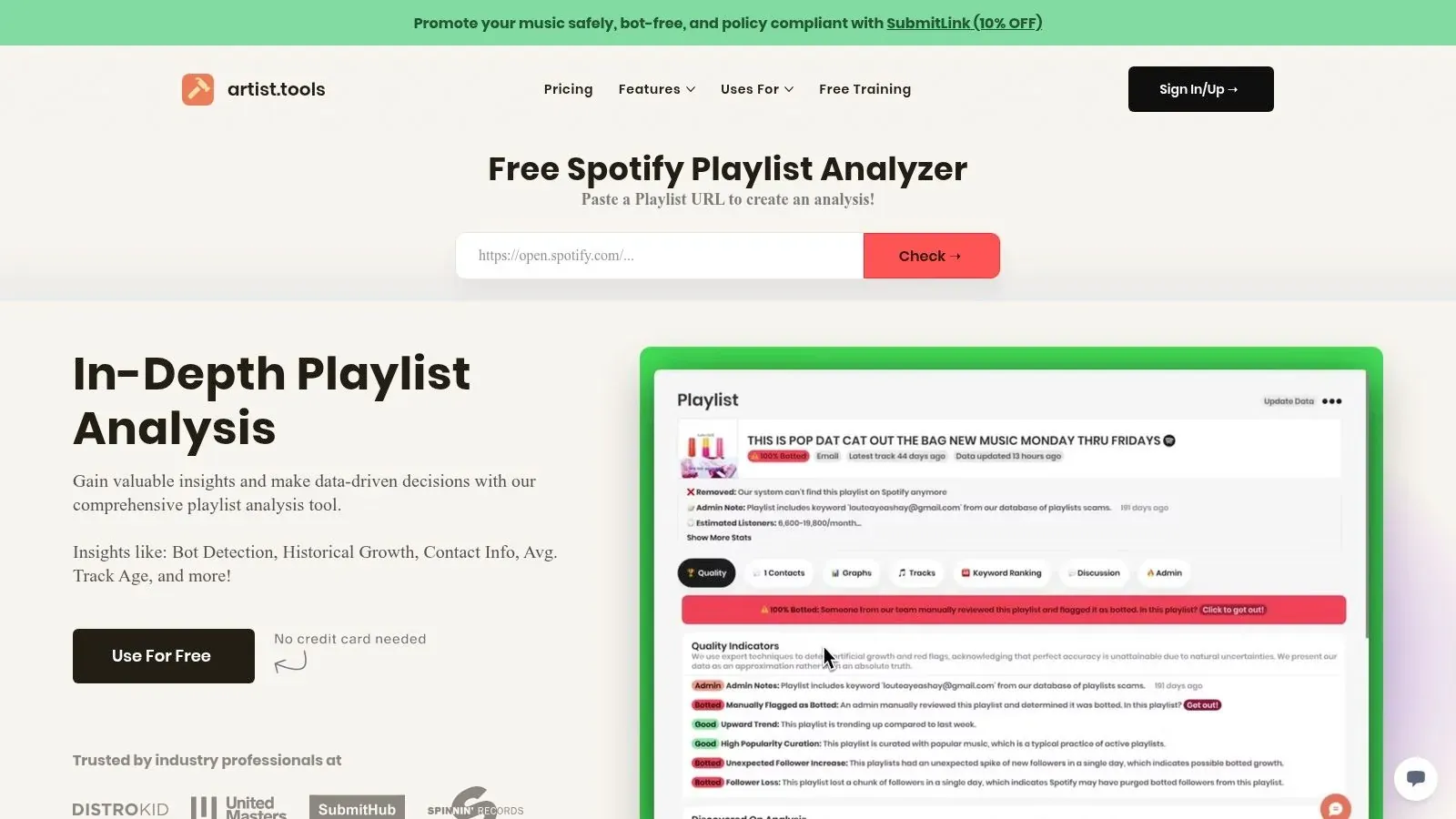
After Spotify’s 2025 bot crackdown removed more than 1.2 million artificial playlists, daily tracking across 5M+ playlists still showed anomalous growth spikes in 25% of independent lists, according to artist.tools Playlist Analyzer data. This is the backdrop behind the common artist question, “Is this playlist real?” The answer can’t come from the link alone. It comes from the data behind it.
Red flags you can spot from the link outward
A suspicious playlist often looks normal at first. The name fits a genre. The cover art looks polished. The follower count may even seem attractive. The problem appears when behavior doesn’t line up with the surface presentation.
Look for signs like these:
- Growth that doesn’t make narrative sense: Sudden surges without a visible reason deserve scrutiny.
- Weak identity: Generic branding and vague descriptions can signal low-effort churn.
- No curator context: If you can’t determine who runs the playlist or what audience they serve, be careful.
- Mismatched tracks: A playlist claiming one niche but featuring random inclusions often points to low editorial integrity.
None of these signs proves a playlist is botted on its own. Together, they tell you whether the link deserves deeper inspection.
What a professional review should include
A proper playlist check should answer four questions. Has follower growth looked natural over time? Do estimated listeners align with the apparent scale of the playlist? Has the track history stayed coherent? Has the playlist shown signs of artificial behavior?
That’s the level of diligence artists need before sending a release into an unknown ecosystem. Before you pitch, run the playlist through the free Spotify playlist bot checker.
A short demo helps make the review process concrete.

Don’t evaluate a playlist by follower count alone. Evaluate whether the audience behavior implied by the link is plausible.
What works versus what doesn’t
Submitting to verified, coherent playlists with visible audience logic works. Chasing inflated lists because they promise fast exposure doesn’t. A bad playlist placement can distort your release data, waste outreach time, and create unnecessary risk around your catalog.
The better workflow is disciplined. Collect candidate links. Review their history. Reject the ones with shaky signals. Pitch only where the playlist’s behavior and musical identity align with your release.
Troubleshooting Common Playlist Link Errors
Most playlist link problems come down to visibility, copy errors, or format confusion. The fix is usually simple once you identify the exact failure point.
The link opens to an error page
This usually means the URL was copied incorrectly, truncated in a message, or pasted with extra characters. Go back to the playlist, copy the link again, and test it in a clean browser tab before re-sending it.
If you’re shortening links with a third-party tool, test both the shortened version and the underlying Spotify destination. A broken redirect can make a healthy playlist look unavailable.
The recipient says the playlist is unavailable
The most common cause is that the playlist isn’t public. A playlist can exist perfectly on your side and still fail as a share destination if its visibility settings block access.
The solution is direct. Confirm the playlist is public, then resend the standard playlist URL. If you’re using a collaborative workflow, make sure you’re not confusing a standard playlist link with a collaborator-specific invite flow.
The embed won’t display on a website
This usually happens when the wrong asset was copied or the page builder strips iframe code. Re-copy the official embed snippet and check whether your CMS allows embedded HTML in that content block.
If the playlist itself is hidden or unavailable, the embed can fail even when the code looks right. Always verify the public destination first, then troubleshoot the website implementation.
The wrong Spotify item opens
This happens when you copied a track, album, or artist link by mistake. It’s common on mobile because multiple share options sit close together.
Use a quick visual check before posting. A playlist URL includes in the path. If it doesn’t, you’re sharing the wrong object.
Frequently Asked Questions
Can I share a link to a private playlist
You can copy and send it, but that doesn’t mean the recipient will be able to access it. If the playlist isn’t public, the link may not function as intended for outside listeners. For general promotion, keep the destination public and test it from a browser where you’re not relying on your own logged-in access.
Should I promote a playlist link or a track link
Use a track link when you want a single-song action, such as pushing a new release, press mention, or social clip. Use a playlist link when you want to shape context, increase session depth, or present a broader taste profile. Curators, managers, and engaged fans often learn more from a strong playlist than from one isolated song.
Can I shorten or customize a Spotify playlist link
Yes, but use care. A shortened link is cleaner in bios, print materials, and campaigns, but it adds another point of failure. If you shorten the URL, verify the redirect path, keep the destination public, and preserve tracking wherever possible so you can measure which placements drive engagement.
artist.tools gives artists and curators the operational layer Spotify itself doesn’t. Use artist.tools to inspect playlist integrity, detect bot activity, track search visibility, monitor historical growth, and make playlist outreach decisions with evidence instead of guesswork.