
Spotify Playlist Mixer: Merge Playlists Easily
Spotify playlist mixer - Learn how to use a Spotify playlist mixer to merge and combine playlists. Discover native tools, third-party apps, and curation best
You have three playlists open. One reflects the sound of the current release. One holds older catalog tracks that still convert with fans. One is a working list for collaborators, references, and pitching. Combining them takes minutes. Making the result sound intentional takes editorial judgment.
A spotify playlist mixer changes how listeners interpret your catalog. Track order sets context, controls energy, and decides whether a listener hears a clear artistic identity or a pile of songs with no hierarchy.
That is why serious artists and curators treat playlist building as a workflow, not a copy-paste task. The job is not only to combine tracks. The job is to preserve metadata, avoid duplicate entries, check whether playlist sources look manipulated, and sequence songs in a way that protects brand positioning. If you want the strategic case for that work, this breakdown of why Spotify playlists are important for artists covers the bigger picture.
Professional mixing also means knowing when Spotify’s built-in options are enough and when you need outside tools. Native features are fine for quick merges. They are limited if you need cleaner curation, curator research, or validation steps such as bot screening with artist.tools before you attach your name to a playlist.
Why Merging Playlists Matters for Artists
An artist launches a new single, sends one playlist link to press, another to fans, and keeps a third version for collaborators. That split usually creates mixed signals. A merged playlist gives every listener the same story about the project, and that consistency matters when streaming drives most music consumption and revenue, as noted earlier.
Playlist mixing is an editorial decision with business consequences. The order of tracks affects completion rate, saves, skips, and whether a new listener understands the artist within the first few songs. If the sequence feels scattered, the catalog feels scattered too.
A good merge also solves a practical problem. Release playlists, catalog playlists, live set references, and fan-favorite collections often overlap, but they were built for different moments. Combining them forces a decision about which tracks still represent the artist, which ones support the current campaign, and which ones should stay out of the public-facing narrative.
That filtering step protects brand positioning.
Artists who handle playlists well usually treat them like release infrastructure. They clean duplicates, check titles and versioning, preserve the right metadata, and make sure the final playlist can be shared confidently with managers, curators, and fans. If a source playlist looks inflated or suspicious, it is worth screening it before pulling tracks or curator associations into your strategy. That matters even more once outside tools enter the workflow.
If you want the larger strategic case, this guide on why Spotify playlists matter for artist growth and positioning gives the broader context.
What a professional merge actually changes
- Listener flow improves because tempo, mood, and intensity changes feel intentional.
- Catalog priorities get clearer because older tracks can support the current release instead of distracting from it.
- Promotion gets easier because one polished playlist is easier to pitch, post, and track than several overlapping versions.
- Risk drops because you can review source playlists for duplication, bad fits, and suspicious signals before attaching your name to them.
A merged playlist should do more than hold songs. It should frame the artist correctly, preserve trust, and make every play more likely to lead to the next one.
Using Spotify’s Native Playlist Mixer
Spotify’s native mixer is the first serious in-app answer to playlist flow. In 2025, Spotify formalized Mix as part of Spotify Premium, describing it as a way to let users “smoothly transition between tracks” and customize flow with volume, EQ, and effect curves, with options including Auto, Fade, and Rise, according to Spotify’s newsroom announcement from 2025-08-19.

Spotify didn’t build a full DJ environment. It built a playlist-level transition editor. That distinction is everything. You’re shaping continuity between tracks, not performing live-routing, stem-based mixing, or club-style reconstruction.
How the native Mix workflow actually works
Spotify’s support documentation is clear about the underlying logic. The mixed-playlist workflow is designed around beat-matched transitions, and it exposes BPM and song key for each track in playlists you created. Continuity depends on compatible tempo and key relationships, so users need to reorder tracks before applying transitions like Fade or Rise, as Spotify explains in its mixed playlists support documentation.
In practice, the workflow looks like this:
- Open a playlist you created.
- Tap Mix.
- Review the BPM and song key shown for each track.
- Reorder songs before you touch transitions.
- Apply a preset such as Auto, Fade, or Rise.
- Adjust volume, EQ, and effects if the preset gets you close but not all the way there.
- Save the version and toggle Mix on or off as needed.
What works well
Native Mix is strongest when the playlist already has internal discipline. Dance music, rhythm-forward pop, melodic electronic, and other transition-friendly material usually respond well because the songs were produced with more predictable rhythmic structure.
It also works well when you’re using the playlist as a listener product, not as a performance artifact. For artist pages, fan onboarding, mood playlists, or premium branded listening sessions, native Mix can be enough.
A quick visual walkthrough helps if you want to see the UI in action before rebuilding a playlist:

Where the native mixer falls short
Native Mix breaks down when you expect it to behave like DJ software. It isn’t a stem-separation engine, and it doesn’t rescue poor pairings automatically. If two adjacent songs are rhythmically incompatible, harmonically tense, or built around awkward intros and outros, the transition will still sound forced unless you manually fix the order and the timing.
This is the trade-off. Spotify gives you a native way to make playlists feel smoother inside the app. It doesn’t give you forensic control over edits, alternate versions, timeline surgery, or export-ready set building.
Use native Mix when your goal is platform-native continuity. Leave it when your goal is production-grade control.
Advanced Mixing with Third-Party Tools
Third-party tools exist for one reason. Professional playlist builders eventually hit the ceiling of native playback editing. When you need timeline control, catalog verification, version matching, and more deliberate transition design, a metadata-bridge workflow is far safer and more flexible than trying to force Spotify into a DJ role it doesn’t serve.
The metadata bridge model
The cleanest example is DJ.Studio. Its workflow doesn’t stream Spotify audio directly into the mix engine. Instead, it imports Spotify playlist metadata such as artist, title, and ISRC, matches that data against licensed catalogs like Beatport Streaming or Beatsource, and then enables AI automixing and timeline editing with licensed audio, as described in DJ.Studio’s explanation of mixing from Spotify playlists.
That distinction solves a major problem. You preserve the curation intelligence of a Spotify playlist while avoiding the restrictions that come with treating Spotify streams as production assets.
Native versus external workflows
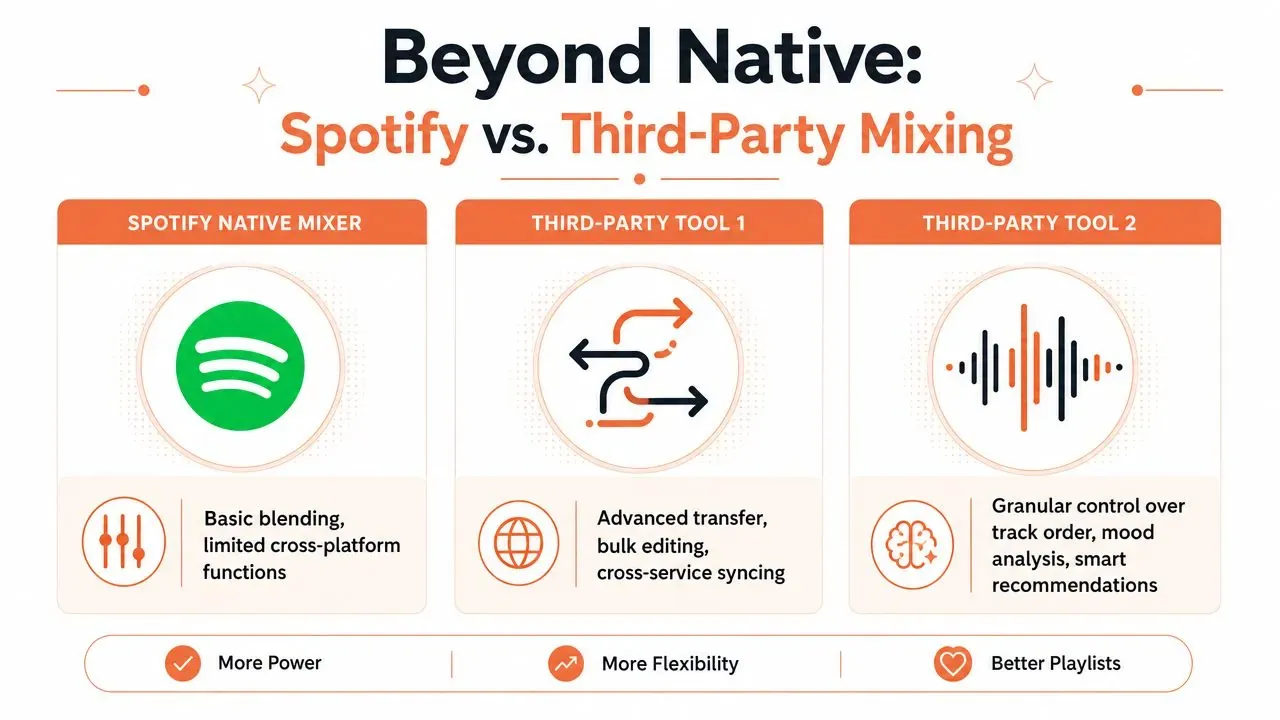
The native Spotify route is simple because it stays inside the playback environment. The external route is stronger because it treats the playlist as metadata first, then rebuilds it in a system designed for editing.
| Feature | Spotify Native Mixer | Third-Party Tools |
|---|---|---|
| Audio source | Spotify playback inside the app | Licensed audio matched from imported playlist metadata |
| Transition control | Presets plus limited adjustment | Timeline-based editing and finer transition design |
| Track analysis | BPM and key exposed in playlist view | BPM, key, automix logic, and deeper sequencing workflows |
| Best use case | Fan-facing playlists and smoother in-app listening | Professional prep, set building, and detailed editorial sequencing |
| Main risk | Abrupt results if order and compatibility are poor | Wrong version match if metadata is ambiguous |
That last row matters more than most users realize. A metadata bridge is only as good as the metadata. If a Spotify playlist contains a radio edit, a remaster, or a localized version with fuzzy labeling, the external tool may match a different cut. That doesn’t make the workflow unreliable. It means you need to verify track identity before export.
When external tools are worth the effort
Use third-party software when the playlist has a business job to do. Examples include launch-event playlists, polished press-facing playlists, pre-show environments, or curator-facing sequence drafts where sloppy transitions undercut the artist’s brand.
External workflows also help when the playlist needs structural editing, not just smoothing. You may want to shorten a dead intro, avoid a key clash by swapping versions, or build a long-form arc that can’t be handled by one-click blending.
Native Mix is for finishing a playlist inside Spotify. Third-party tools are for rebuilding the playlist as an editable project.
Research also gets easier when you compare your playlist structure against competing lists in your lane. For that, curators often use databases that surface relevant playlist ecosystems, such as this Spotify playlist list resource.
The trade-off professionals accept
Third-party control costs time. You’ll spend more effort checking matches, confirming versions, and refining transitions. That’s worth it when the playlist represents an artist publicly. It isn’t worth it for every casual merge.
The decision is simple. If the playlist only needs to feel smoother in Spotify, use native Mix. If the playlist needs editorial precision, licensed-audio matching, and controlled sequencing, move outside the app.
Best Practices for Curating Merged Playlists
Merged playlists fail for predictable reasons. They’re too long, too unfocused, too flat in energy, or too vague in presentation. A professional spotify playlist mixer workflow fixes those problems before you touch promotion.
Build the arc before you polish the joins
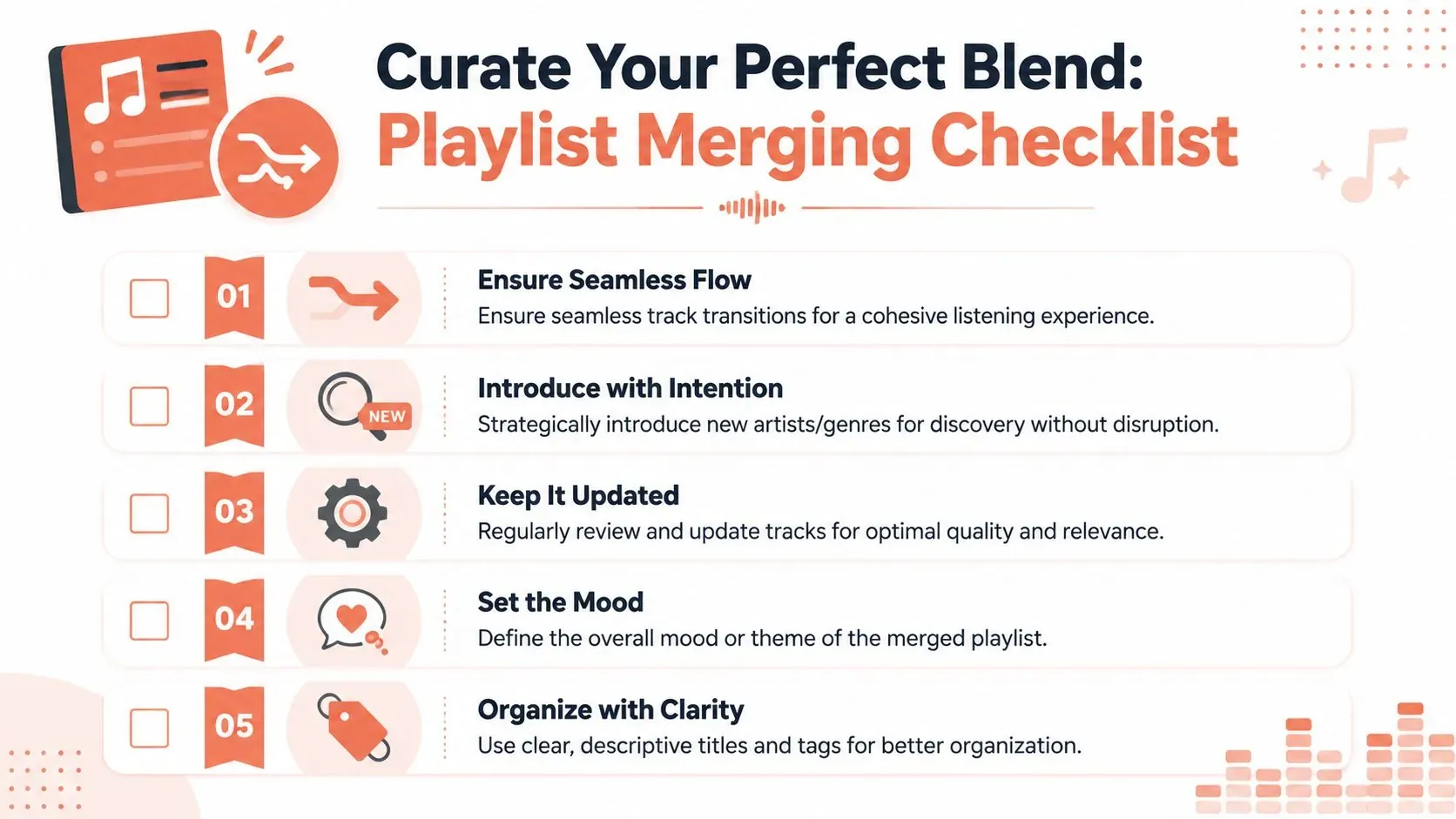
Start by deciding what the playlist is supposed to do. Is it an artist introduction, a mood world, a workout sequence, a catalog bridge between eras, or a release-support object built around a new single? If you can’t answer that in one sentence, the merge isn’t ready.
Then shape the arc:
- Open with identity. The first few tracks should establish tone fast. Don’t bury the songs that explain the playlist.
- Group by compatible motion. Similar energy, rhythm, and harmonic feel usually sequence better than broad stylistic leaps.
- Place discovery carefully. New artists, deep cuts, and left turns work better after trust is established.
- End with intention. A playlist should either resolve, escalate, or leave a clean cliffhanger. Random endings feel abandoned.
A merged playlist should sound like someone made decisions, not like software merged folders.
Use metadata as editorial guidance
BPM and key are useful because they give you objective constraints. They do not replace taste. Two tracks can be technically compatible and still feel wrong because of vocal density, drum tone, lyrical mood, or arrangement shape.
A good curation pass usually asks four questions:
- Does the energy move too sharply?
- Does the next vocal arrive too fast?
- Does the low end reset awkwardly?
- Does the genre jump feel earned?
Experienced curators consistently outperform automation. The machine can suggest compatibility. The curator decides whether the transition supports the story.
Treat playlist SEO as part of curation
A merged playlist that nobody can find doesn’t do enough work. Titles and descriptions should reflect real listener language, not internal shorthand. Avoid clever names that hide the genre, use case, or mood unless the playlist already has audience momentum.
For search research, platforms like artist.tools can help you inspect keyword demand, Spotify search behavior, and where playlists surface over time. That’s useful when naming a merged playlist for discovery rather than only for existing fans.
A few naming rules hold up consistently:
- Lead with recognizable terms when the playlist targets a search behavior.
- Keep the concept legible so the title and description support each other.
- Don’t stuff keywords if they distort the mood promise.
- Refresh metadata deliberately when the playlist focus changes.
Review like a curator, not a collector
The final pass should remove sentimentality. If a track weakens flow, confuses theme, or pulls attention away from the artist identity the playlist is supposed to reinforce, cut it.
That’s the discipline most merged playlists lack. Good curation isn’t addition. It’s selection under pressure.
Troubleshooting Common Playlist Mixing Issues
Most playlist problems aren’t technical failures. They’re sequencing errors, duplicate clutter, and lost context. Fix those directly and the playlist usually improves fast.
Duplicates and version collisions
Duplicates rarely arrive as exact copies. More often, they show up as album versions, remasters, deluxe reissues, clean edits, and alternate regional releases of the same song. A merged playlist with those collisions feels messy and can create unintentional repetition.
Use this cleanup approach:
- Scan artist-title pairs first to catch obvious repeats.
- Check runtime differences because alternate edits often reveal themselves there.
- Confirm the intended version before deleting anything, especially if one version has a better intro or outro for mixing.

Abrupt transitions and awkward crossfades
If a transition sounds clumsy, don’t assume the mixer failed. Usually the songs were paired badly, the transition point was placed without listening for arrangement changes, or the incoming track starts with an element that demands more space.
Try these fixes in order:
- Reorder the pair.
- Lengthen or shorten the transition.
- Switch the preset.
- Replace one of the tracks with a more compatible version.
- Remove the transition entirely if a hard cut sounds cleaner.
Some songs shouldn’t be blended. A clean stop into a strong opening can sound more confident than a forced fade.
Metadata loss and historical context
Merging playlists often strips context that mattered when the original lists were built. Date-added order, campaign sequencing, and release-era groupings can disappear once everything lands in one place.
The practical fix is simple. Preserve a source copy before the merge, keep a working draft for edits, and use naming conventions that record what changed. If the playlist supports release strategy, save a versioned archive before major resequencing so you can recover the editorial history later.
Validating Playlists and Discovering Curators
A polished playlist still needs validation. If a merged playlist pulls in tracks connected to suspicious promotion patterns, it can create avoidable risk around discovery, reputation, and who you decide to pitch next.
That’s why integrity checks belong at the end of the workflow. Before pushing a playlist publicly, review whether the surrounding playlist ecosystem looks credible, whether curator behavior appears consistent, and whether the list belongs in the lane you think it does. If you’re evaluating playlists operationally, artist.tools offers playlist analysis features for bot detection, follower history, listener estimates, curator contact information, and search visibility. That’s useful both for auditing your own merged playlist context and for filtering out questionable targets before outreach.
The second half of validation is opportunity. Once your playlist is clean, you can use the same research mindset to identify curators who fit your genre and audience. For outreach strategy, this guide on how to find Spotify playlist curators is a practical place to start.
A good merged playlist isn’t just better listening. It’s a sharper promotional object. Clean structure helps listeners stay with it. Clean validation helps you trust where it sits.
If you want to audit playlist quality, research curator ecosystems, or track how playlists perform in Spotify search, artist.tools gives artists and curators a data layer for that work without turning playlist building into guesswork.